Live Prep with Paper Trading Sims
Paper trading simulators are tools that let you practice trading futures contracts using virtual funds. These platforms simulate real-time market conditions, allowing you to test strategies, learn market behavior, and fine-tune your skills without risking actual money. With features like live market feeds, historical Market Replay, and tools for testing automated systems, simulators help traders prepare for the challenges of live trading. They’re especially useful for futures markets, where leverage can magnify both profits and losses.
Key Takeaways:
- Simulators replicate trading environments using real-time and historical data.
- Platforms like NinjaTrader and Tradovate offer advanced tools for strategy testing.
- Configuring realistic settings (e.g., matching your trading budget) ensures better preparation.
- Market Replay lets you practice past sessions, speeding up your learning process.
- Simulators help manage psychological challenges and refine risk management skills.
For beginners or those preparing for prop firm evaluations, these tools provide a safe way to build confidence and test strategies before transitioning to live trading.
What Paper Trading Simulators Do and Why They Help
Paper trading simulators bring live market data from major exchanges like CME, NYMEX, and ICE right to your screen, mimicking real-time order execution [2][4]. For example, if you place a limit order on an instrument like the E-mini S&P 500, the simulator tracks actual bid and ask prices to determine whether your order would have been filled - just like in a real trading account. Advanced platforms, such as NinjaTrader's Sim101, go a step further by monitoring your cash balance, profit and loss, commissions, and margin, creating a virtual experience that mirrors a live account [1][8]. This integration of real-time data forms the backbone for both live and historical market simulations.
In addition to real-time practice, simulators like Market Replay use historical tick-by-tick data to recreate past trading sessions. This allows you to fast-forward through slow periods or rewind to re-examine key moments, letting you practice a market open multiple times in one hour. This feature can significantly speed up your learning curve compared to relying solely on live market conditions [4]. Some platforms even include advanced tools like Level 2 bid/ask data and Time & Sales feeds, which help you practice reading order flow and spotting where institutional traders are entering or exiting positions [3][9].
How Simulators Copy Real Market Conditions
High-quality simulators are designed to replicate market conditions with precision. They match the exact tick values of various futures instruments - for instance, $10.00 per tick for Crude Oil and Gold [4]. This level of detail helps you understand how a 4-point move in the E-mini S&P 500 translates to $200 per contract, allowing you to grasp market swings without risking real money. These platforms also support all standard order types, including market, limit, stop, and market-if-touched orders, so you can see how they interact with live price movements [1][8][9].
Top-tier simulators provide additional tools like VWAP (Volume Weighted Average Price), Floor Trader Pivot Points, and even a "Trend Slider" for testing automated strategies and stop-loss orders under specific market scenarios [2][4][8]. This realistic setup not only sharpens your technical skills but also prepares you mentally for the challenges of live trading.
Mental and Strategy Benefits
"Every performance domain relies on practice away from formal competition to build performance in the heat of the moment."
Trading psychologist Dr. Brett Steenbarger emphasizes this critical principle [9][3]. Simulators allow you to test and refine your entry and exit rules, experiment with stop-loss placements, and adjust position sizing - all without putting your capital at risk [10][11]. Over time, you can build a statistical dataset to determine whether your strategy has a mathematical edge [12].
The emotional benefits are just as important as the technical ones. By comparing your simulated results with your live trading performance, you can pinpoint how emotions like fear, greed, or anxiety might be affecting your decisions [13][3]. To address this, some traders create accountability by attaching real-world consequences to mistakes made during simulation, helping them build discipline without financial risk [4]. This combination of mental and strategic preparation is essential for navigating the high-pressure environment of live futures trading.
Why Futures Traders Need Paper Trading
Futures markets are notoriously challenging, with most traders losing their initial accounts within 90 days due to the risks of trading real money in high-leverage conditions [4]. Each futures contract also has its own "personality" - for example, Crude Oil tends to trade with technical precision, while Gold reacts sharply to inflation-related news [4]. Paper trading allows you to familiarize yourself with these nuances across different instruments.
If you're preparing for a prop firm evaluation with companies like Topstep or Apex, simulators are indispensable. These firms enforce strict rules, such as daily loss limits and trailing drawdowns, and repeated reset fees can cost $150 or more per month [4]. Many experienced traders follow the "3-Time Rule": don’t pay for a professional funding evaluation until you’ve successfully passed the requirements three times in a row on a simulator [4]. Mastering these tools and strategies in a simulated environment gives you the confidence and readiness to transition to live-market execution.
How to Pick a Paper Trading Platform
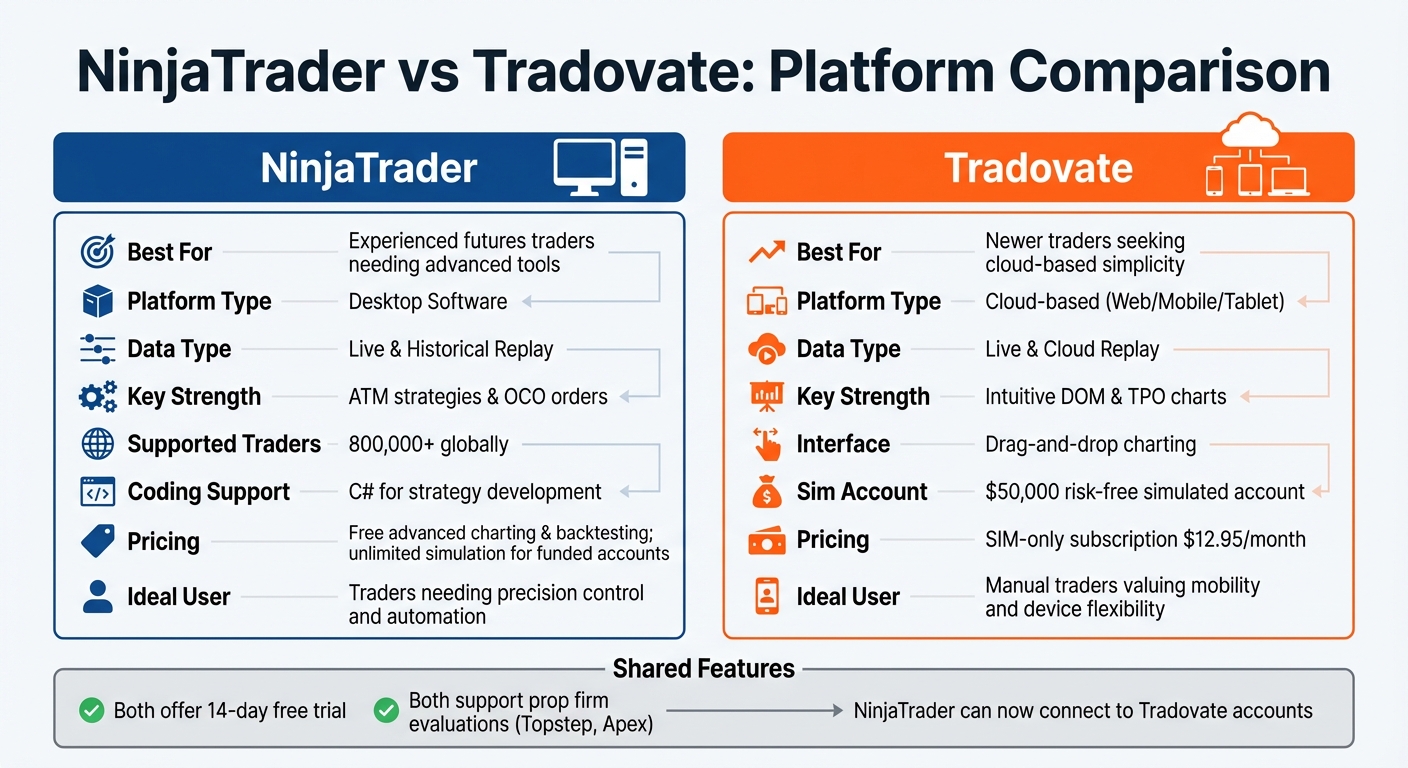
NinjaTrader vs Tradovate Platform Comparison for Futures Trading
Choosing the right paper trading platform is a key step in developing trading skills that mirror real-world conditions. With the essential features in mind, let’s look at how platforms like NinjaTrader and Tradovate stack up.
Features That Matter Most
For realistic practice, real-time data is non-negotiable. Some platforms restrict free accounts with a 5-second chart delay, which can make split-second decision-making during volatile market opens impossible [18]. If you're preparing for day trading, delayed data turns your simulator into little more than a chart viewer.
Advanced order types like OCO (One-Cancels-Other) and ATM (Advanced Trade Management) are equally important. These features help manage risk in fast-paced futures markets. A Depth of Market (DOM) module is another must-have, allowing you to view the limit order book and practice placing orders as you would in a live trading environment [5][14].
A standout feature to look for is Market Replay, which lets you skip slow periods or replay the same trading session multiple times. This tool allows you to practice several market opens within an hour - an efficient way to sharpen your skills [4][9].
Customizing your account settings is also critical. If you plan to trade with $4,000, practicing with a $100,000 simulated account won't prepare you for the psychological and risk management challenges of live trading [6][7]. Additionally, a good platform should factor in commissions, exchange fees, NFA fees, and clearing fees, helping you calculate your net profitability before risking actual money [1][6].
Now, let’s see how NinjaTrader and Tradovate meet these requirements.
NinjaTrader and Tradovate for Futures Trading
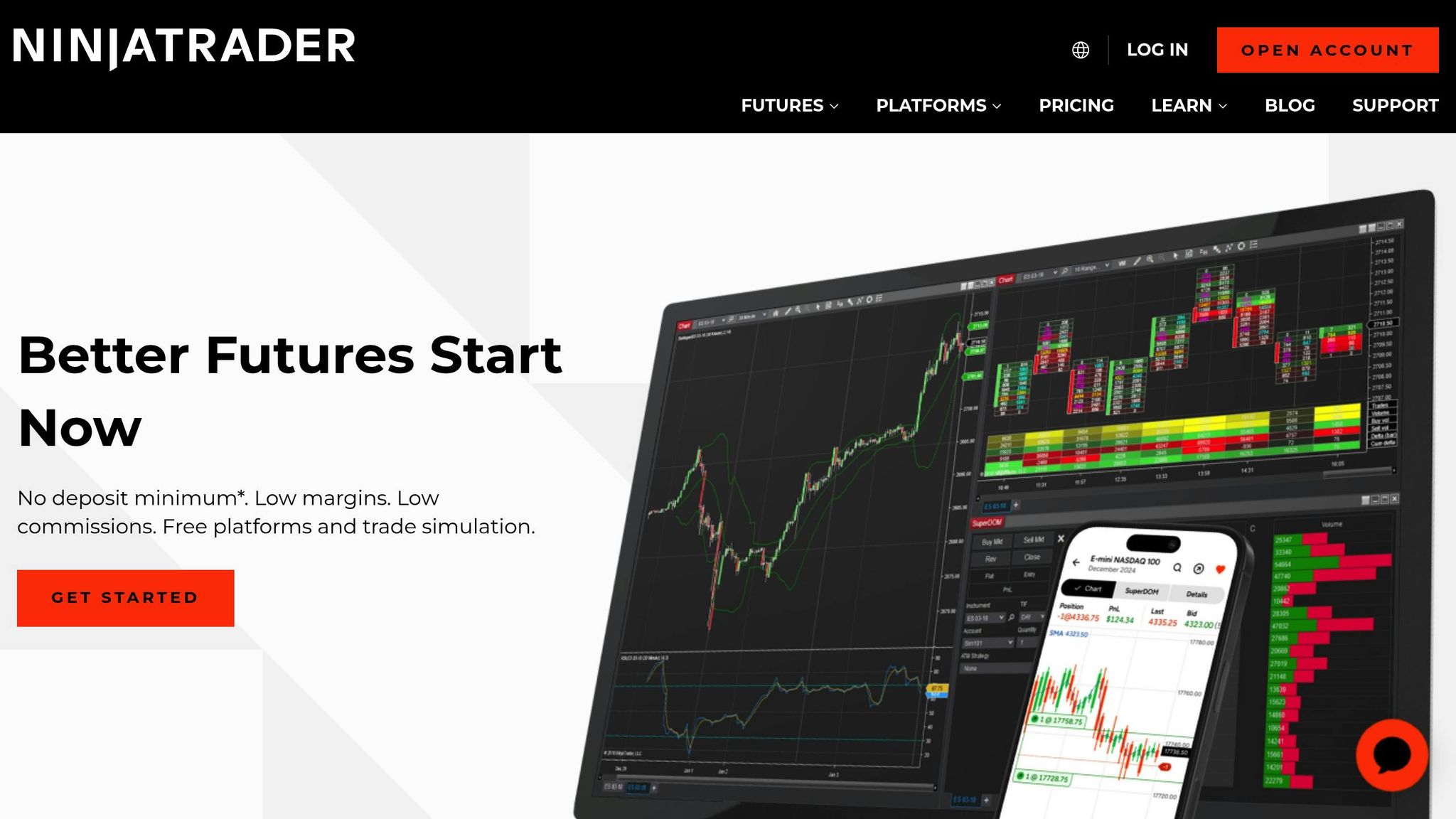
NinjaTrader is a downloadable desktop platform designed for traders who need advanced tools and deep customization. It supports over 800,000 traders globally and includes a powerful backtesting engine with C# coding for strategy development [1][15]. The platform’s "Sim101" account mimics a live brokerage account by tracking profit, loss, cash balances, and margin requirements [1][8]. Its ATM strategies make it a top choice for traders who need precision control or plan to automate their systems [15].
On the other hand, Tradovate offers a modern, cloud-based experience accessible via web browsers, mobile devices, and desktops. With drag-and-drop charting, it’s beginner-friendly while still offering robust tools [15][16]. Tradovate provides a $50,000 risk-free simulated account and a 14-day free trial with real-time data [5]. It’s ideal for manual traders who value mobility and want to manage positions from any device [16].
Interestingly, NinjaTrader now allows users to log in to Tradovate accounts through its NinjaTrader 8 Desktop platform, combining Tradovate’s low commissions with NinjaTrader’s advanced tools [16][17].
Platform Feature Comparison
| Feature | NinjaTrader | Tradovate |
|---|---|---|
| Best For | Experienced futures traders needing advanced tools [14] | Newer traders seeking cloud-based simplicity [14] |
| Data Type | Live & Historical Replay [2] | Live & Cloud Replay [5] |
| Platform Type | Desktop Software [1] | Cloud-based (Web/Mobile/Tablet) [6] |
| Key Strength | ATM strategies & OCO orders [14] | Intuitive DOM & TPO charts [5] |
When it comes to pricing, Tradovate offers a SIM-only subscription for $12.95/month, which includes unlimited simulated trading. However, features like real-time data and Market Replay may incur additional fees [6]. NinjaTrader, on the other hand, provides free access to advanced charting and strategy backtesting, with unlimited simulation included for funded accounts [2][1]. Both platforms are widely supported for prop firm evaluations, including those with Topstep and Apex [16][4].
To decide which platform suits you best, try the 14-day free trial offered by both. If you’re looking for detailed technical analysis and custom indicator development, NinjaTrader’s more complex interface is worth the effort [15]. If you prioritize flexibility and a clean, device-friendly interface, Tradovate’s cloud-based design might be the better fit [16].
Setting Up Your Simulator to Match Live Trading
To get the most out of your trading practice, it's essential to configure your simulator to reflect real-world conditions. Many trading platforms come with default settings that can be misleading - such as overly large starting balances, no commissions, and unrealistic margin requirements. These settings might make your simulated results look better than they would in live trading, which can lead to costly surprises when you transition to real money.
Account and Risk Settings
Start by aligning your simulator's initial balance with the actual amount you plan to trade. For example, if your trading budget is $4,000, set your simulator to match that amount. This approach forces you to practice proper position sizing and risk management from the start [1].
In NinjaTrader, you can adjust these settings by going to the Accounts tab in the Control Center, right-clicking the "Sim101" account, and selecting "Edit Account." Here, you can modify your starting balance, commissions, and risk parameters [1]. Keep in mind that most simulators don’t automatically include commission rates or exchange fees. If you skip this step, a strategy that looks profitable in simulation might turn out to be a losing one in live trading once fees are factored in.
Understanding position sizing is another critical element. For instance, a 10-point loss on the NQ with one contract equals $200, but with 10 contracts, that same move would cost you $2,000 [4]. Practicing with realistic position sizes helps you avoid expensive mistakes later on.
If you're preparing for a prop firm evaluation, configure your simulator to match the firm's requirements. This includes setting up Daily Loss Limits, Profit Targets, and Trailing Drawdowns to mirror their rules [4].
"Do not pay for a Topstep combine until you have passed it 3 times in a row on Tradingsim. This discipline alone will save you thousands of dollars in reset fees",
- John McDowell, trading educator and author [4].
Order Types and Execution Settings
Make sure you practice using the same order types you'll rely on in live trading, such as limit, stop-market, market-if-touched, and OCO orders. Many traders stick to basic market orders during simulation, only to struggle with more complex orders when trading live in volatile conditions [1].
To get a feel for real-time market dynamics, enable features like Level 2 data (which shows bid/ask depth) and Time & Sales to track how orders interact in the market [3]. As trading psychologist Dr. Brett Steenbarger points out:
"Having a plan in the calm of the moment is different from maintaining and acting on the plan once we get punched in the nose!"
[3].
Be aware that simulators often provide ideal fills, which don't always match live market behavior. For example, during high volatility, your limit order might not fill at your desired price, or your stop-loss might execute several ticks away from where you set it [4]. Using tools like Market Replay can help you practice handling these scenarios. With Market Replay, you can fast-forward through quiet periods and focus on key trading sessions, giving you the chance to sharpen your skills under realistic conditions [4].
Getting Accurate Market Data
Real-time market data is a must for effective practice. Some free accounts only offer delayed data, which won't cut it if you're preparing for fast-paced day trading. Delayed data reduces your simulator to little more than a charting tool, making it hard to build the split-second decision-making skills you'll need during live trading.
Using Market Replay can give you a significant edge. This feature lets you replay historical tick-by-tick data from major market events or specific trading sessions, allowing you to practice critical moments multiple times in a single hour [4]. It's a great way to compress months of experience into just a few weeks of focused practice.
Platforms like NinjaTrader offer a free 14-day trial with real-time data [2], while others, such as Tradingsim, provide access to years of historical tick-by-tick data for a fixed monthly fee [4]. Just make sure your data feed matches the instruments you plan to trade live. Some platforms may support equities and forex but offer limited options for futures and options unless you connect directly to a brokerage [19]. With accurate data and settings in place, you'll be better prepared to move on to testing automated futures trading platforms.
Testing Automated Systems in Paper Trading
When moving from simulations to live-market execution, testing automated systems becomes a critical step. By using realistic simulator settings, you can validate your strategies to ensure they perform as expected when faced with real-world conditions.
Using Backtesting and Market Replay
Backtesting is a powerful tool that applies your strategy's entry and exit rules to extensive historical data sets, all without manual input [20]. It serves as a statistical check, showing how your approach would have performed in the past. Pair this with Market Replay, which allows you to replay historical tick-by-tick data as though it were happening live. This combination speeds up testing while highlighting potential problems, such as mismatches between your strategy and your account balance display, all before risking actual money [8][4][21].
Platforms like NinjaTrader make this process accessible by offering a free backtesting engine and unlimited simulated trading. This makes it an excellent option for futures traders who want to test automated systems without incurring upfront costs [2].
Once backtesting and Market Replay confirm your strategy's initial performance, the next step is a detailed performance evaluation.
Measuring Strategy Performance
After testing your strategy with backtesting and Market Replay, it’s time to dig into the results. Review each trade to ensure that your algorithm’s positions align with the simulated account balance [21].
A reliable way to measure success is by running a sample of 100 trades and checking the profit factor - the ratio of gross profits to gross losses. A profit factor above 1.5 indicates that your strategy has a strong edge, even after factoring in commissions and slippage [4].
"Automation helps remove these emotional tendencies, enforcing the backtested rules of your strategy trade after trade."
- NinjaTrader Team [21]
Once you’ve confirmed your strategy’s performance, it’s time to introduce real-world challenges like slippage and latency.
Adding Slippage and Latency to Simulations
Most paper trading platforms offer "ideal" fills, meaning orders are executed instantly at the exact price you specify. However, this doesn’t reflect real-world trading conditions [22]. In live markets, slippage - when your order fills at a worse price than expected - is common, especially during high-volatility periods or major news releases like CPI reports [4].
To prepare, use Market Replay to simulate trading during volatile sessions. Pay attention to how stop-loss orders might execute several ticks away from your target, or how limit orders might not fill at all during rapid price movements [4]. Some platforms even let you manually add simulated slippage and latency settings to better mirror live trading delays.
Before committing significant capital, consider transitioning to Micro E-mini contracts (e.g., MES). These contracts mirror the data and charts of full-sized contracts but come with one-tenth the financial risk [4]. This step allows you to experience real-world execution and slippage dynamics while keeping your financial exposure manageable.
Moving from Paper Trading to Live Trading
Making the leap from paper trading to live trading can be a tricky step. Many traders jump into the live market too soon, risking real money before they've fully grasped both the technical and emotional demands of trading [4][23].
Handling the Mental Shift to Real Money
Trading with real money often stirs up survival instincts that can interfere with your trading plan [23]. As trader Ed Martin puts it:
"It is just your self-preservation instincts taking control" [23].
To ease this mental transition, try attaching simulated consequences to your paper trading mistakes. For example, if you break a trading rule during simulation, do something like a set of push-ups or skip a leisure activity. This approach helps train your mind to respect risk without putting actual money on the line. Another helpful tip is to hide your unrealized profit and loss (P&L) during trades. This encourages you to focus on your charts and execution plan rather than reacting emotionally to every dollar movement [23].
When you're ready to go live, start small with Micro E-mini contracts (MES). These contracts mirror the data and patterns of standard E-mini contracts (ES) but reduce risk significantly - just $5 per point compared to $50 per point. For instance, a 10-point loss on the Nasdaq 100 (NQ) with one contract equals $200; with 10 contracts, the loss jumps to $2,000 [4].
These mental and practical adjustments can help you approach live trading with a clearer mindset and a better handle on risk.
Applying Simulation Results to Live Trading
Before putting real money on the line, set specific benchmarks to ensure you're ready. For example, complete at least 100 trades using a single strategy, aim for a profit factor above 1.5, and demonstrate the ability to handle a drawdown without breaking your rules [4]. Align your simulator balance with the budget you'll use for live trading [22][6]. Once you go live, keep your risk low - limit it to 1% per trade and always use stop-loss orders [22]. If you're evaluating a funded account, practice under strict mock evaluation rules, including daily loss limits and trailing drawdowns, before paying for the actual evaluation [4].
Keeping a detailed trading journal is also crucial. Record not just your trading results but also your emotional state and the reasoning behind your decisions. As Michael Zarembski, Director of Futures at Schwab, explains:
"One skill that I see successful traders have is the ability to block out the noise of the financial media and other pundits and follow their particular trading plan" [22].
This habit helps you spot psychological biases that might surface when real money is at stake.
Preparing Your Trading Infrastructure
In addition to mental preparation and strategy refinement, your technical setup must be ready for live trading. Live markets introduce challenges that simulators can't fully replicate, like network instability, execution delays, and sudden price spikes. Even a brief connection issue during a volatile session can turn a winning trade into a loss.
Using a service like TraderVPS can help minimize these risks. TraderVPS offers 24/7 uptime, ultra-low latency to exchanges, and automatic backups to reduce the chance of technical failures. Their plans include:
- VPS Lite ($69/month): Supports 1-2 NinjaTrader charts with 4x AMD EPYC cores and 8GB RAM.
- VPS Pro ($99/month): Handles 3-5 charts with 16GB RAM and multi-monitor support.
- VPS Ultra ($199/month): Designed for intensive setups with 24x AMD EPYC cores and 64GB RAM.
When transitioning from simulation to live trading, ensure your custom indicators, strategies, and workspaces are transferred to your live environment [25]. Start with the smallest position size - just one contract - to test your setup. If your live losses exceed the worst drawdown you experienced during simulation, it's time to pause and reassess. This could mean your strategy needs adjustment, or market conditions may have shifted [24].
Conclusion
Paper trading simulators provide a safe space to build and refine your futures trading skills without putting real money on the line. Tools like NinjaTrader and Tradovate offer essential features like order types and automation testing, giving you the chance to experiment and learn before facing the pressures of live markets. The market replay tools on these platforms are especially useful, allowing you to condense hours of market activity into a fraction of the time, speeding up your learning curve [4].
However, moving from simulation to live trading is about more than just having a profitable strategy. The psychological leap is significant. Trading in a risk-free environment can sometimes lead to decision-making habits that don’t hold up under real-world pressure. As trading experts often point out, the strategies you plan in calm conditions can feel entirely different when the stakes are real [3]. To bridge this gap, it’s helpful to attach meaningful consequences to mistakes made during simulation and to start small, perhaps with Micro E-mini contracts, to ease into live trading.
On the technical side, simulators can’t fully replicate the challenges of live markets. Real trading involves dealing with issues like network instability, execution delays, and sudden price swings. To minimize these risks, consider using services like TraderVPS, which ensure 24/7 uptime and ultra-low latency, helping you avoid technical hiccups during volatile market sessions.
Ultimately, strong simulation results lay the groundwork for live trading success. Before making the leap, test your strategy across at least 100 trades, aim for a profit factor above 1.5, and ensure you’re prepared to stick to your rules even during drawdowns [4]. Remember, nearly 90% of traders fail when they transition to live trading too quickly [4]. A disciplined and thoughtful approach to this transition is key to building a foundation for long-term success.
FAQs
How can I set up my paper trading account to closely match live trading conditions?
To make your paper trading account feel as close to live trading as possible, start by setting your initial balance to the same amount you plan to trade with in real life - say, $50,000. This way, your profits, losses, and margin calculations will reflect what you'd experience with a real account.
Next, configure commissions and fees to match what your broker charges, including any exchange or clearing fees. This ensures your trade costs are realistic. Use real-time market data rather than delayed feeds to better simulate actual market conditions. Adjust your order execution settings to account for factors like slippage and latency, as these are common in live trading. Also, make sure your margin requirements and contract details, such as tick size and time zone, are aligned with those of your live account.
By fine-tuning these elements, you'll create a more realistic trading environment, helping you build confidence and refine your strategies before putting real money on the line.
What should I look for in a paper trading simulator for futures markets?
When selecting a paper trading simulator for futures, focus on features that mimic real trading as closely as possible. A good platform should let you customize account settings, including starting balance, commission rates, and margin requirements, so you can align the simulator with your actual trading setup. Having access to real-time market data or high-quality historical data is crucial for creating realistic scenarios with accurate price movements and order executions.
Look for simulators with strong strategy-testing tools that let you analyze both manual and automated strategies using historical data, offering detailed performance metrics to refine your approach. Equally important are comprehensive charting tools - think advanced indicators, diverse chart types, and multiple timeframes - that help you study and evaluate trading setups effectively. Lastly, choose a platform that supports unlimited trades and allows you to adjust balances as needed, giving you the freedom to experiment with various risk management strategies without any financial pressure.
How can paper trading simulators help traders handle emotional challenges?
Paper trading simulators offer a chance to experience the market in real-time conditions without putting your money on the line. They’re a great way to practice, learn, and experiment with trading strategies without the fear of financial loss. By mimicking live market scenarios, these tools help you build confidence, sharpen your techniques, and develop the discipline needed to handle the ups and downs of trading.
Another key benefit is the opportunity to understand how emotions like anxiety or excitement can impact your decisions. For instance, you might notice tendencies like chasing losses or closing trades too early. By recognizing these patterns, you can adopt strategies such as setting stop-loss levels or limiting trade sizes to keep your emotions in check. This kind of preparation can help you approach live trading with a calmer, more controlled mindset.