Deploying Low-Latency NICs for Trading Nets
In trading, speed is everything. Low-latency network interface cards (NICs) are critical for reducing delays in high-frequency trading environments. Here's why they matter:
- Latency Impact: A microsecond delay can cost millions in missed trading opportunities. Specialized NICs cut execution times from milliseconds to nanoseconds.
- How They Work: Low-latency NICs bypass the operating system, process data directly in hardware (like FPGAs), and support features like kernel bypass, RDMA, and precision time protocols.
- Performance: These cards handle market data spikes, reduce jitter, and maintain consistent speed under heavy loads, offering sub-microsecond response times.
- Key Options: Devices like the Arista 7130 and Cisco Nexus K3P-S deliver ultra-fast performance, with latencies as low as 4 nanoseconds.
Choosing the Right NIC depends on workload, budget, and infrastructure. Proper configuration (e.g., disabling interrupt moderation, optimizing BIOS settings) and colocating servers near exchanges further enhance performance. For traders, these tools ensure faster execution and better trading outcomes.
Power your capital markets with the new AMD Solarflare™ X4 Series Low-Latency Ethernet Adapters
What Makes a NIC Low-Latency
Standard network cards rely on the operating system to process packets, which naturally introduces delays. Low-latency NICs, on the other hand, are designed with specialized hardware and software to eliminate these delays, making them ideal for speed-critical tasks. Let’s break down the features that enable these performance boosts.
Kernel Bypass and Hardware Timestamping
One standout feature of low-latency NICs is kernel bypass. This technology allows the NIC to transfer data directly to an application's memory, skipping the Linux kernel and the standard IP stack entirely[6]. The result? A dramatic reduction in packet delivery time - from 4.3 microseconds down to just 0.47 microseconds. For comparison, standard kernel delivery takes 8 microseconds for idle applications and 4 microseconds for busy-polling processes[7].
Another crucial feature is hardware timestamping. By using the NIC's internal clock to timestamp packets as soon as they hit the wire, this method eliminates delays caused by operating system scheduling[5][7]. Additionally, on-device memory reduces latency by minimizing PCI transactions. Each transaction between system RAM and a NIC adds around 300 nanoseconds[5]. By storing outgoing packets directly in on-chip memory, the NIC ensures consistent performance, even during high-volume trading periods - essential for fast order execution.
RDMA and Precision Time Protocol (PTP)
Low-latency NICs also benefit from Remote Direct Memory Access (RDMA), which facilitates direct memory transfers without involving the CPU[6]. This zero-copy operation allows data to move seamlessly between the NIC and application memory, freeing up the CPU to focus on trading logic rather than data management. Combined with kernel bypass, RDMA significantly reduces the time it takes for data to go from reception to processing.
Precision Time Protocol (PTP) is another game-changer. This feature synchronizes clocks across the network with sub-nanosecond accuracy[5][2]. Such precision helps feed handlers quickly identify and discard outdated market data caused by network congestion. Considering market data can spike from 86 Mb/s to 382 Mb/s in just one millisecond[1], the ability to detect even microsecond-level delays is critical for maintaining data quality.
Some NICs go a step further with FPGA integration. Field Programmable Gate Arrays enable the NIC to handle tasks like multiplexing, filtering, and even executing order-entry logic directly in hardware. For instance, FPGA-based order entry can process orders from multiple servers and send them to an exchange in just 39 nanoseconds[2]. Similarly, Layer 1 crosspoint chips can replicate traffic across ports in as little as 5 to 7 nanoseconds[2].
Bandwidth and Performance Specs
Although 10GbE is the standard for low-latency trading, the metric that really matters is wire-to-userspace latency - the time it takes for a packet to go from the NIC to the application. High-performance NICs achieve median latencies of just 780 nanoseconds for small packets[9], with some FPGA-based cards delivering TCP half-roundtrip times of 930 nanoseconds[9].
The PCIe interface is equally important. Low-latency NICs often use PCIe Gen 3 x8 (8.0 GT/s per lane)[9] to ensure the connection between the NIC and CPU doesn’t become a bottleneck. Advanced trading NICs also offer highly precise hardware timestamping, with resolutions ranging from 6.2 nanoseconds down to an impressive 250 picoseconds[8][9]. In contrast, standard NICs rely on software timestamps that only achieve millisecond-level accuracy.
Lastly, buffer sizing plays a vital role. These NICs are designed with optimized buffering to handle sudden spikes in bandwidth - common in market data feeds - without causing store-and-forward delays[1]. This ensures smooth and reliable data flow, even under heavy network loads.
Best Low-Latency NICs for Trading
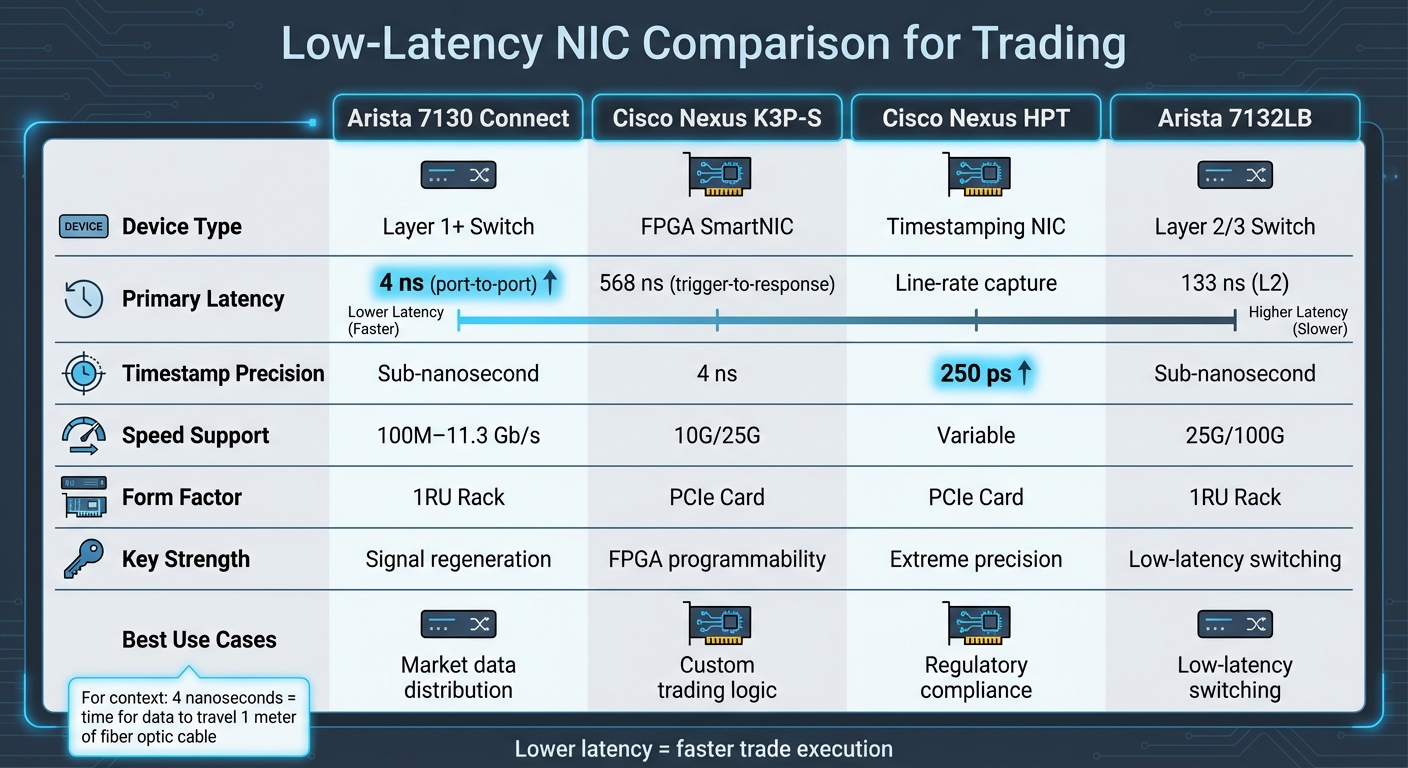
Low-Latency NIC Comparison for High-Frequency Trading
When it comes to low-latency network interface cards (NICs) for trading, the options generally fall into two main categories: Layer 1 switches designed for ultra-fast data distribution and FPGA-based SmartNICs tailored for host-based trading applications. Each type is optimized for a specific role in high-frequency trading environments. Understanding the essentials of HFT in futures markets is crucial when selecting hardware for these specialized environments.
Layer 1 devices, such as the Arista 7130 Connect Series, deliver incredibly low port-to-port latencies of just 4 nanoseconds - equivalent to the time it takes for data to travel one meter of fiber optic cable [11]. These switches are particularly effective for tasks like market data replication and tapping. For instance, the Arista 7130B can replicate traffic across a staggering 256 ports in only 7 nanoseconds [2], making it a top choice for distributing market feeds to multiple trading servers at once.
On the other hand, FPGA-based SmartNICs, like the Cisco Nexus K3P-S, are built for flexibility and speed. They achieve trigger-to-response latencies as low as 568 nanoseconds [12] and support speeds ranging from 100 Mb/s to 25 Gb/s, all configurable through firmware updates. Features like preloading can shave off an additional 60 nanoseconds from the transmit path [12]. Moreover, Cisco's ExaSOCK technology accelerates TCP/IP performance, enabling standard socket-based applications to operate at hardware-level speeds without requiring code changes.
NIC Comparison Chart
| Feature | Arista 7130 Connect | Cisco Nexus K3P-S | Cisco Nexus HPT | Arista 7132LB |
|---|---|---|---|---|
| Device Type | Layer 1+ Switch | FPGA SmartNIC | Timestamping NIC | Layer 2/3 Switch |
| Primary Latency | 4 ns (port-to-port) [11] | 568 ns (trigger-to-response) [12] | Line-rate capture | 133 ns (L2) [13] |
| Timestamp Precision | Sub-nanosecond [10] | 4 ns [12] | 250 ps [8] | Sub-nanosecond |
| Speed Support | 100M–11.3 Gb/s | 10G/25G | Variable | 25G/100G |
| Form Factor | 1RU Rack | PCIe Card | PCIe Card | 1RU Rack |
| Key Strength | Signal regeneration [11] | FPGA programmability [12] | Extreme precision [8] | Low-latency switching [13] |
For aggregating data, the Arista MetaMux achieves this in just 39 nanoseconds [10], allowing multiple servers to consolidate orders over a single connection. Meanwhile, traders needing precise timestamping to meet regulatory standards can turn to the Cisco Nexus High Resolution Timestamp (HPT) NIC, which offers 250 picosecond precision [8], far exceeding MiFID II requirements.
How to Choose the Right NIC
Selecting the best NIC for your trading needs depends on several factors, including workload, budget, and existing infrastructure.
Start by identifying your primary workload. If your goal is to distribute market data to multiple servers, Layer 1 devices like the Arista 7130 Connect with its 4-nanosecond port-to-port latency [11] are ideal. For trading strategies that require custom logic - like pre-trade risk checks or order filtering - FPGA-based SmartNICs such as the Cisco Nexus K3P-S provide the programmability you need through firmware development kits [12].
Budget considerations are also key. While Layer 1 switches tend to have a higher upfront cost, they can serve multiple servers simultaneously, making them a cost-effective choice for larger deployments. In contrast, SmartNICs require one card per server, but their flexibility allows for strategy-specific optimizations. Don’t forget to factor in the total cost of ownership, including power consumption and cooling needs, especially if you’re operating in colocation facilities where rack space is limited and expensive.
Your existing infrastructure will also influence your decision. Check for compatibility with your current setup, whether it’s cabling (SFP+ vs. QSFP, copper vs. fiber) or available PCIe Gen 3 x8 slots for SmartNICs. For example, the Cisco Nexus V5P offers a compact, low-profile form factor [8], making it suitable for smaller servers, while the Arista 7130 requires a standard 1RU rack space. If you’re running trading platforms for rapid high-frequency trades like NinjaTrader, prioritize NICs that support kernel bypass and socket acceleration libraries to optimize performance on Windows-based systems.
Finally, deterministic performance is just as critical as raw latency. Look for NICs with advanced buffering capabilities to handle microbursts without adding jitter. The Arista 7130 MetaWatch, for instance, offers deep buffering up to 32 GB [10] and sub-nanosecond timestamping to maintain consistent performance during volatile market conditions. For distributed trading systems, ensure the NIC supports Precision Time Protocol (PTP) or includes an onboard GNSS receiver for grandmaster clock synchronization [8].
How to Configure Low-Latency NICs
Required Configuration Settings
Getting your NIC (Network Interface Card) set up correctly can bring latency down from milliseconds to sub-microsecond levels. Start by disabling interrupt moderation - sometimes called Interrupt Throttle Rate (ITR) - and set it to "Off", "Minimal", or "Low." This ensures the NIC generates an interrupt as soon as a packet arrives instead of batching multiple packets together. You can use the following command to force immediate packet processing:
ethtool -C <interface> rx-usecs 0 rx-frames 0
Next, disable adaptive coalescing, LRO (Large Receive Offload), and GRO (Generic Receive Offload). These settings can introduce delays by batching packets, so turning them off ensures packets are processed immediately. Use this command to verify these features are disabled:
ethtool -k <interface>
Also, turn off Ethernet Flow Control to prevent unexpected pauses in transmission. Disable the Nagle algorithm by enabling the TCP_NODELAY option, which ensures small packets are sent immediately instead of being buffered.
Another key step is increasing your RX and TX ring buffer sizes to their maximum supported value - usually 2,048 or 4,096 descriptors. This helps avoid packet drops during traffic spikes. You can check the current buffer settings with:
ethtool -g <interface>
Many NICs default to only 256 descriptors, which can quickly become a bottleneck during high-traffic periods, such as market volatility. To further reduce latency, ensure your NIC, memory, and CPU cores are all within the same NUMA (Non-Uniform Memory Access) domain. This avoids cross-socket traffic, which can add unnecessary delays. Additionally, review your BIOS PCIe settings and enable "Relaxed Ordering" to allow the NIC to issue more read requests and reduce high read latencies.
Advanced Optimization Techniques
After setting up the basics, you can push performance even further into the sub-microsecond range. Start by pinning your trading application to CPU cores local to the NIC using tools like taskset or numactl. Disable irqbalance to ensure consistent handling of network interrupts. You can also reserve specific CPU cores exclusively for trading by adding the isolcpus parameter to your Linux boot command line, which prevents the operating system from assigning other tasks to those cores.
Set your BIOS to "High Performance" mode, disable power-saving C-states, and minimize SMI (System Management Interrupts) activity to avoid wake-up delays and latency spikes. Ensure your NIC is running at its maximum rated speed and width. For example, a PCIe Gen3 x8 card should show "Speed 8GT/s, Width x8" when you check with the lspci -vv command.
For the lowest possible latency, consider bypassing the kernel entirely by using technologies like DPDK (Data Plane Development Kit). This allows your application to poll the NIC directly for incoming packets, skipping the delays caused by kernel interrupts.
Testing and Monitoring NIC Performance
Once you've applied both the basic and advanced configurations, it's essential to test and monitor your NIC's performance. Use ethtool -S <interface> to check hardware counters like rx_missed, rx_dropped, or rx_fifo_errors. Any non-zero values here may indicate that buffers are filling up faster than they can be processed. Additionally, check /proc/interrupts to confirm that network interrupts are being handled by the correct CPU cores. Tools like ss or data from /proc/net/snmp can help identify application-level bottlenecks.
For precise latency measurements, use specialized tools like sfnt-pingpong or sfnettest. To validate throughput performance on high-speed connections (e.g., 100G), run tests with iperf3 (version 3.16 or later). For example, low-latency tuning on mid-range hardware - such as an AMD EPYC processor paired with an X2522 NIC - has achieved one-way latencies as low as 0.973 microseconds at the 0th percentile and 3.042 microseconds at the 99th percentile [4].
Ongoing monitoring is equally important. Use Precision Time Protocol (PTP) to maintain accurate network timestamps, which are essential for measuring one-way latency reliably. Back in 2007, a major investment bank estimated that every millisecond of latency could cost $100 million annually in lost opportunities [14]. By following these tuning and monitoring practices, you can ensure your configurations directly contribute to faster and more reliable trading execution.
Hosting Infrastructure for Low-Latency Trading
Colocation and Exchange Proximity
When it comes to trading latency, every meter counts - literally. A single meter of fiber optic cable can add about 4 nanoseconds of delay [3]. That’s why the physical location of your trading server is so important. Colocation, which involves placing your server within the same data center as an exchange’s matching engine, helps minimize the distance your orders need to travel. For example, exchanges like CME Group even standardize cable lengths to ensure equal physical distance for all colocated servers. For high-frequency traders, this setup can reduce round-trip latency for orders and market data to under 50 microseconds on 10G networks [15].
Some firms are also experimenting with microwave and radio frequency (RF) links between key trading hubs like London and New York [16].
Thomas Lanaute from BSO highlights the stakes: "A delay of just a few milliseconds can lead to missed trades or less favorable prices" [16].
While microwave connections can be faster than fiber, they come with their own set of challenges. They’re more prone to weather-related disruptions and have lower bandwidth compared to fiber, which offers more stable connectivity.
Infrastructure Requirements for Low-Latency Hosting
To achieve sub-microsecond execution, having the right hosting infrastructure is just as important as fine-tuning your network interface cards (NICs). A high-speed 10Gbps network is crucial for managing the bursts of market data that occur during trading. Direct fiber-optic cross-connects can bring latency down to as little as 0.3–2 milliseconds [3].
Layer 1 switches play a key role in ultra-low-latency setups. Unlike Layer 2/3 switches, which can add delays of hundreds of nanoseconds, Layer 1 switches can replicate traffic across up to 256 ports in just 7 nanoseconds [2]. Combine these with FPGA-based multiplexers, and you can achieve order entry round-trip times as low as 44 nanoseconds [2].
Blackcore Technologies explains the importance of these switches: "The core purpose of a network switch in a trading stack between a server and an exchange is to be able to share that connectivity between multiple trading servers without introducing a large amount of latency" [3].
Redundancy is another must-have. Hosting facilities should include backup generators, advanced cooling systems, and multiple telecom carriers to ensure uninterrupted operations around the clock [15]. For firms without a local presence, facilities offering 24/7 "remote hands" services for maintenance and troubleshooting are highly recommended [15]. To push latency reduction even further, custom-length cables and hollow-core fiber can be employed [3].
These elements form the backbone of ultra-low-latency hosting, a standard embraced by providers like TraderVPS.
TraderVPS Hosting Solutions
TraderVPS has designed its Chicago servers to meet these rigorous standards, colocating them with CME Group’s matching engines. This setup achieves latency of less than 0.52 milliseconds to the exchange [17][18][19]. With direct fiber-optic cross-connects, trade orders can be transmitted and executed in under 1 millisecond [19].
The hardware powering these servers includes AMD EPYC processors, DDR4/DDR5 RAM, and NVMe M.2 SSDs, all chosen for their speed and reliability. The network offers a base connection of 1Gbps with the ability to burst up to 10Gbps to handle periods of high data throughput [17][19]. Servers run on Windows Server 2022, pre-configured for low-latency trading, and are compatible with platforms like NinjaTrader, MetaTrader, and Sierra Chart [17][19].
TraderVPS ensures 99.999% uptime, backed by enterprise-grade DDoS protection and advanced firewall configurations. This reliability is critical for automated trading strategies that require continuous operation.
According to TraderVPS, "Our Chicago-based infrastructure is specifically optimized for ultra-low-latency trading, offering unparalleled processing power and stability to ensure your strategies run continuously and efficiently" [19].
These capabilities ensure that automated trading systems remain operational and competitive, delivering the performance needed for fast and efficient trade execution.
Conclusion
Setting up low-latency NICs for trading networks involves much more than just buying the right hardware. To truly harness their potential, you need to understand how these cards function and fine-tune their configuration. For instance, using kernel bypass technology can slash packet delivery times from 4.3μs to 0.47μs - a staggering 10x improvement[7]. This is further enhanced by disabling interrupt coalescing, pinning processes to specific CPU cores, and optimizing your network stack. Together, these adjustments translate to noticeable gains in execution speed.
But even the most advanced hardware won't perform optimally without the right environment. A $20,000 FPGA-based NIC won't deliver its worth if your server is located far from the exchange or if BIOS settings aren't optimized. As Blackcore Technologies aptly states, "The server is only one part of a trading stack"[3]. Achieving peak performance requires more than just powerful equipment - it demands strategic placement of servers and careful configuration to reduce physical distance and latency.
Consider the impact of Layer 1 switches, which can replicate traffic in as little as 7 nanoseconds[2]. Pair these with optimized NICs and colocation near exchange matching engines, and round-trip times can drop to an astonishing 44 nanoseconds[2]. These kinds of improvements can be the deciding factor between seizing a trading opportunity or missing out.
For traders using automated platforms like NinjaTrader, the underlying infrastructure is just as critical. For example, TraderVPS's Chicago-based servers boast latencies as low as <0.52 milliseconds to CME Group's matching engines[20]. This level of precision ensures trading systems can operate at the speeds modern markets demand.
FAQs
How do low-latency NICs enhance performance in high-frequency trading?
Low-latency NICs are built to cut down network processing delays, often bringing latency down to just a few microseconds. This capability is vital for high-frequency trading systems, where rapid processing of market data and quick execution of orders can make all the difference.
These NICs can handle millions of messages per second with impressive reliability, ensuring faster data flow and order execution. For traders operating in markets where even a microsecond can tip the scales, this speed advantage is a game-changer.
What should I look for in a low-latency NIC for trading networks?
When choosing a low-latency NIC for trading, prioritize features designed to enhance speed and efficiency. Look for high bandwidth options such as 10 Gbps or 40 Gbps, along with support for kernel-bypass technologies like RDMA. Features like multiqueue functionality can help distribute network traffic more effectively, while interrupt coalescing reduces CPU usage. For precise trade execution, hardware timestamping ensures timing accuracy.
It's also important to check that the NIC is compatible with your trading platform and matches your system's PCIe generation. To get the best performance in high-frequency or automated trading setups, make sure to configure the NIC properly and keep its drivers up to date.
What are the best ways to optimize my network card for low latency in trading?
To minimize latency in trading, start by installing your network card in one of the fastest PCIe slots available, such as x8 or x16, to maximize performance. Then, adjust the driver settings to a low-latency profile. This disables power-saving features and prioritizes speed over energy efficiency. On Windows, make sure to turn off energy-saving options and reduce or disable interrupt moderation. For Linux users, tools like ethtool can help fine-tune these settings for better performance.
Enable features like Receive Side Scaling (RSS) or multiqueue support to spread network traffic across multiple CPU cores, which speeds up data processing. Assign specific CPU cores to handle network tasks for even faster performance. To further optimize, configure your operating system for real-time networking by tweaking advanced NIC properties and prioritizing network-related processes. After making these adjustments, use latency measurement tools to test your setup. This ensures you’re seeing consistent improvements without introducing packet loss. These steps can greatly boost the speed and dependability of your trading platform.