Bookmap DxFeed: Live Futures Data Access
Bookmap, paired with DxFeed, offers traders real-time, full-depth market data for U.S. futures and equities, updating at lightning-fast speeds. This combination provides a clear visualization of market liquidity and order flow, enabling traders to make informed decisions based on historical and live data. Key highlights include:
- Heatmap Visualization: Tracks historical order book activity, revealing liquidity zones and price movement patterns.
- Ultra-Low Latency Data: Delivered via exchange co-location for faster updates.
- Customizable Data Packages: Choose specific exchanges like CME, CBOT, or ICE to align with your trading strategy.
- Integration with NinjaTrader: Seamlessly connects with NinjaTrader 8 for advanced order flow analysis and execution.
With tools like the Liquidity Heatmap, Absorption Indicators, and Volume Bubbles, Bookmap transforms raw data into actionable insights, while DxFeed ensures data delivery with minimal delays. Whether you're a scalper, day trader, or algorithmic trader, this setup provides unparalleled visibility into market microstructure.
Pricing Example:
- CME Bundle: $97/month (includes CME, CBOT, NYMEX, COMEX)
- Individual Exchange: $37/month
- ICE US Futures: $219/month
For optimal performance, consider using a low-latency VPS like TraderVPS to handle the high data load efficiently.
This integration of DxFeed and Bookmap empowers traders to analyze, visualize, and react to market activity with unmatched precision.
Complete Bookmap Guide 2025 - Heatmap & Orderflow Platform
DxFeed Features for Live Futures Data
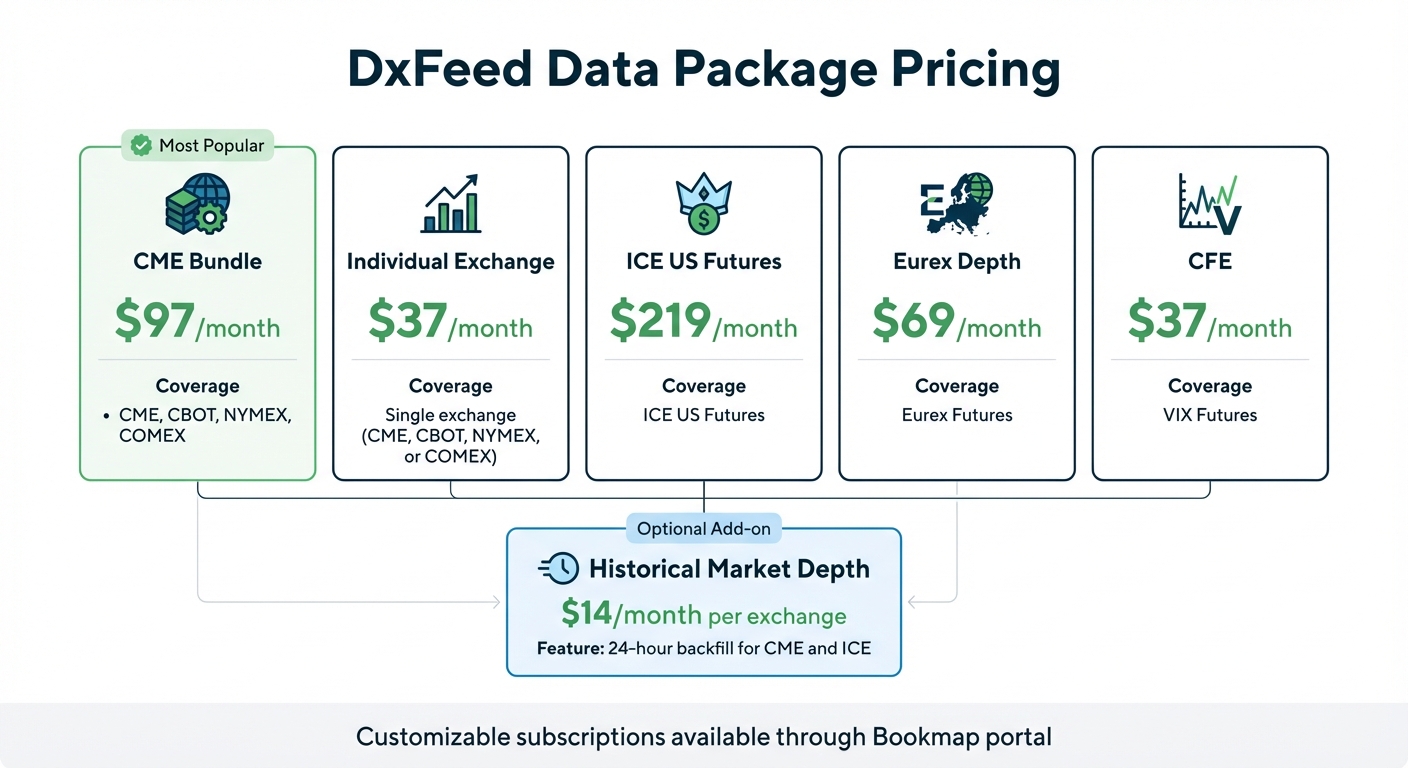
DxFeed Futures Data Pricing Packages Comparison
Real-Time Market Data
DxFeed provides Level 2 vs. Level 3 market data through exchange co-location, which minimizes delays - an essential feature for high-frequency trading environments [1]. The service covers major U.S. futures exchanges like CME, CBOT, NYMEX, COMEX, ICE US, and CFE, offering access to essential futures contracts [4][1].
Traders gain visibility into every movement in the order book as it happens, revealing the complete market microstructure. This data goes beyond simple price quotes, exposing the underlying supply and demand at each level. For those needing historical insights, DxFeed offers a 24-hour market depth backfill for CME and ICE instruments, available at $14.00 per month per exchange [1]. This comprehensive data forms the backbone of Bookmap's advanced visualization tools, which are discussed below.
Bookmap Visualization Tools
DxFeed powers Bookmap's visualization features, transforming raw data into actionable insights. The Liquidity Heatmap uses full-depth data to highlight resting orders, order pulls, and sweeps across price levels. Meanwhile, the 3D Bubbles feature tracks traded volume, helping traders identify significant transactions and monitor how liquidity shifts throughout the session [4][1].
For those using Bookmap's Global+ package, DxFeed unlocks advanced indicators like the Absorption Indicator, which identifies zones of high liquidity where large orders are filled, and Imbalance Indicators, which point out discrepancies in the order book that often precede price movements. Falk, a trader at Heldental, describes the advantage of these tools:
"Many platforms only allow you to analyze the present activity of the order flow via a DOM, but with Bookmap our traders at Heldental can analyze the history and present of the order flow visually to gain an edge for the future" [4].
These tools also integrate with NinjaTrader, enhancing order flow analysis for futures traders. Beyond visualization, DxFeed allows traders to tailor their data access to meet specific trading needs, as explained below.
Customizable Data Feeds
DxFeed subscriptions can be customized through the Bookmap portal, enabling traders to subscribe only to the exchanges relevant to their strategies. For instance, you can subscribe to COMEX data for $37.00 per month or opt for the CME Bundle at $97.00 per month, which includes CME, CBOT, NYMEX, and COMEX [4][1].
| Data Package | Monthly Price | Coverage |
|---|---|---|
| CME Bundle | $97.00 | CME, CBOT, NYMEX, COMEX |
| Individual Exchange | $37.00 | Single exchange (CME, CBOT, NYMEX, or COMEX) |
| ICE US Futures | $219.00 | ICE US Futures |
| Eurex Depth | $69.00 | Eurex Futures |
| CFE | $37.00 | VIX Futures |
This flexible subscription model allows traders to align their data expenses with their specific strategies, avoiding unnecessary costs. It's particularly useful for NinjaTrader users who focus on specific futures markets.
Benefits for NinjaTrader Futures Traders
Better Decision-Making
Bookmap and DxFeed bring a game-changing approach to how NinjaTrader users interpret market activity. Instead of relying on the fast-changing numbers of a traditional Depth of Market (DOM) display, traders gain access to a visual history of order flow. This allows them to see where liquidity is building, where it's being withdrawn, and where large orders are being executed.
This detailed view uncovers the full market microstructure and highlights the behavior of major market players. By analyzing historical order flow and spotting recurring patterns, traders can make more informed decisions. This clarity not only enhances manual trading but also provides a solid foundation for fine-tuning automated strategies.
Support for Algorithmic Trading
The same real-time data that benefits manual traders also powers automated systems. DxFeed's exchange co-location ensures ultra-low latency data, reducing network delays and providing full order-by-order depth. This level of detail enables algorithms to identify key liquidity areas in the order book, such as iceberg orders or institutional trading patterns.
As Bookmap emphasizes:
"In the era of automated trading, order flow visualization is the only way a human can compete with a machine."
Through NinjaScript integration, Bookmap synchronizes DxFeed's data with NinjaTrader 8, ensuring that charts and order flow activity are perfectly aligned for automated execution. This precise data integration empowers traders to design advanced algorithmic models that leverage microstructure insights for a competitive edge.
NinjaTrader Compatibility
Bookmap's seamless integration with NinjaTrader creates a unified trading experience. With Bookmap version 7.3 or higher, traders can connect to NinjaTrader 8 using a special adapter plugin and NinjaScript. To fully utilize Bookmap's features, a subscription to Level 2 data is required, as it provides the 10+ levels of market depth essential for professional-grade order flow analysis - something Level 1 data cannot offer. Once set up, traders can use Bookmap's heatmap to track liquidity shifts while executing trades through NinjaTrader's familiar interface, combining the strengths of both platforms in one streamlined workflow.
Setup Guide for Bookmap DxFeed Connection
Requirements and Compatibility
Before getting started, make sure you have Bookmap v7.1 or later installed. You'll also need a stable internet connection with at least 25 Mbps to ensure ultra-low latency performance. For live futures trading, a subscription to either the Global plan ($49/month) or the Global+ plan ($99/month) is required. Keep in mind that the free "Digital" version only supports cryptocurrency. The Global+ plan comes with additional perks like advanced indicators and broker integration (e.g., Interactive Brokers, TradeStation), while the Global plan focuses on data visualization.
DxFeed provides full market depth (Level 2) data for major futures exchanges, including CME, CBOT, NYMEX, COMEX, ICE US, CFE (VIX), and Eurex. You can customize your data package to suit your needs - check the DxFeed Features section for pricing details. For those who need historical data, the Historical Market Depth add-on ($14/month per exchange) offers up to 24 hours of backfill, seamlessly integrating with live feeds. By default, local data files are stored in C:\Bookmap\Data, while troubleshooting logs are found in C:\Bookmap\Logs.
Once you’ve confirmed these requirements, follow the steps below to set up and configure your DxFeed connection.
Installation and Configuration
After ensuring all prerequisites are met, you can move forward with installation and setup. Log in to your Bookmap account to purchase the necessary DxFeed data packages. Download the latest version of Bookmap from the official website, then navigate to Connections > Configure. Select dxFeed from the provider list. If you bought the data package directly through Bookmap, the connection will authorize automatically without needing extra credentials.
Once connected, you can add continuous symbols like "ES" for the S&P 500 E-mini. Keep an eye on the rollover icon, and confirm that the Heatmap and DOM (Depth of Market) are updating in real time.
Troubleshooting Common Issues
If you encounter any problems during setup, here are some steps to help resolve them:
- Missing or incomplete historical data: If you notice gaps or see a "Cloud data time out" error, go to
C:\Bookmap\Data, delete the contents, and re-subscribe to the instrument. This forces a fresh download of cloud data. - License issues: If your upgraded license only shows one hour of data instead of 24, restart Bookmap to apply the updated license settings.
- Data outside trading hours: Some exchanges do not provide data during off-hours. If data seems missing, use the Symbol Table or go to Help > Symbols in the main menu to confirm you’ve entered the correct symbol and exchange.
If these steps don’t solve the issue, email support@bookmap.com. Include a screenshot of the problematic symbol and attach the log files from C:\Bookmap\Logs for faster assistance.
Performance Optimization with TraderVPS
Low-Latency Trading Environment
When using DxFeed and Bookmap to process full order depth data, speed is everything. Every millisecond counts as the platform tracks every shift in the order book across up to 20 parallel instrument subscriptions. This creates a massive data load that needs to be processed efficiently. That’s where a low-latency VPS environment becomes critical, especially in today’s markets where automated trading systems dominate. TraderVPS addresses this need with servers based in Chicago, delivering latency as low as 0.52ms and network speeds exceeding 1Gbps. This setup ensures DxFeed’s co-located data feeds flow seamlessly into your Bookmap visualization, avoiding any bottlenecks [7]. This low-latency infrastructure forms the backbone for smooth scaling and dependable resource allocation.
Scalability and Reliability
Low-latency connectivity is just the start - scalability is equally important for handling Bookmap’s demanding data processing tasks. Running Bookmap alongside DxFeed requires significant computational power, especially when monitoring multiple futures contracts at once. Features like heatmap rendering and volume dot visualization demand dedicated CPU and RAM to maintain performance. TraderVPS offers flexible plans to match your trading needs, from the VPS Lite plan at $69/month (4x AMD EPYC cores, 8GB RAM) to the Dedicated Server plan at $299/month (12+ AMD Ryzen cores, 128GB RAM). With a 99.999% uptime guarantee [7], your Bookmap setup stays operational around the clock, regardless of local hardware or internet issues. Plus, NVMe storage speeds up the loading of historical backfill data - up to 24 hours of market depth - for instant order flow analysis.
Security and Uptime
Performance is crucial, but so is ensuring your trading environment is secure and always available. TraderVPS provides robust protection against external threats and internal failures. Features like DDoS protection and multi-layered security protocols keep your Bookmap configurations, custom indicators, and trading data safe [7]. Automated backups add an extra layer of security, preserving your heatmap templates and analytical setups in case of unexpected issues. The enterprise-grade infrastructure, combined with unmetered bandwidth, effortlessly handles the high data volume from DxFeed’s full Level 2 feeds. This is especially important for traders using advanced tools like absorption or imbalance indicators. With over 4,000 users already leveraging the DxFeed and Bookmap integration [4], TraderVPS delivers the dependable and secure performance needed for both manual and automated trading strategies.
Trading Strategies and Applications
These strategies demonstrate how traders take advantage of the platform's tools to navigate real-market situations, leveraging its detailed data delivery and visualization capabilities.
Order Flow Analysis
With DxFeed's real-time, full-depth data, traders use the liquidity heatmap to pinpoint areas where institutional orders accumulate, revealing key support and resistance zones. These clusters help traders identify where major players are building positions or pulling liquidity as prices approach critical levels. Paired with Volume Bubbles, which display executed trades and identify imbalances, traders can detect aggressive buying or selling pressure - often a precursor to potential reversals [8].
Advanced features like the Iceberg Detector and Large Lot Tracker expose hidden institutional activity that traditional candlestick charts fail to capture. For instance, large orders are often split into smaller ones to mask market intent, a tactic frequently used during "stop runs" [2][8]. As seasoned traders have observed, Bookmap's visualization tools help anticipate support and resistance areas more effectively [4]. The platform's nanosecond-level zoom allows for precise trade entries, while the Record & Replay feature enables traders to review volatile events tick-by-tick, refining their strategies [8].
Scalping and Day Trading
Scalpers rely on the heatmap to spot liquidity gaps - sections of the order book with few or no large orders. When prices move into these zones, they often accelerate due to the lack of resistance [9][10]. Tools like DOM Pro offer single-click execution and full market depth, crucial for quick decisions in fast-moving markets. Traders also monitor for large orders that suddenly vanish from the book, which can signal spoofing attempts aimed at creating false supply or demand [9].
The Cumulative Volume Delta (CVD) is another essential tool, tracking the net difference between buying and selling pressure. This helps scalpers identify when a trend may be losing steam. During major economic events, such as FOMC meetings, experienced traders often adjust by reducing position sizes and widening stop-loss orders to account for heightened volatility [9]. The platform’s delivery of full order depth across CME, CBOT, NYMEX, and COMEX - via co-located data centers - ensures the speed critical for high-frequency trading strategies [2][1].
These fast-paced strategies are most effective when paired with robust risk management.
Risk Management
The heatmap’s ability to visualize resting liquidity is a valuable tool for setting stop-loss levels behind significant liquidity walls, helping traders limit exposure during market sweeps [8]. Before entering trades near high-liquidity areas, it’s important to observe whether the order size remains steady or shrinks as price approaches - a rapid decrease often signals a "spoof" order that will likely be canceled [9]. Falk, a trader, explains:
"Many platforms only allow you to analyze the present activity of the order flow via a DOM, but with Bookmap our traders at Heldental can analyze the history and present of the order flow visually to gain an edge for the future" [4].
Customizable price and voice alerts ensure traders can react immediately when prices hit specific liquidity zones, reducing the delays that can increase risk. Additionally, order flow imbalance indicators highlight when one side of the market is exhausted, offering clear exit signals before reversals occur [2].
Conclusion
The combination of Bookmap and dxFeed creates a powerful toolkit for futures traders seeking complete market depth and real-time visibility into order flow. By sourcing data directly from co-located exchange servers - including CME, CBOT, NYMEX, COMEX, and ICE - traders gain access to every order at every price level. This level of detail goes far beyond what standard retail feeds can offer [2][3]. When paired with Bookmap's heatmap and 3D volume bubbles, traders can identify institutional activity and better predict price movements [2][3].
NinjaTrader users also enjoy smooth integration with Bookmap (v7.3+), allowing them to execute trades directly from charts and access up to 48 hours of historical backfill data [6][11]. While these tools are essential, the true advantage lies in the low-latency infrastructure that supports them.
In futures trading, where speed is critical, reliable infrastructure is non-negotiable. Data speed and depth hinge on having a robust setup, and even milliseconds can make or break an opportunity to capture liquidity [5]. TraderVPS ensures this reliability with low-latency servers, NVMe storage, DDoS protection, and automatic backups, delivering uninterrupted and lightning-fast data.
Together, dxFeed’s high-quality data feeds, Bookmap’s advanced visual tools, and TraderVPS’s dependable infrastructure create a cohesive trading ecosystem. This integration supports a wide range of trading strategies, from in-depth order flow analysis to high-frequency scalping, all while ensuring stable connections and consistent data quality. For serious futures traders, this setup redefines how market microstructure analysis and execution are approached.
FAQs
Do I need Level 2 data for Bookmap with DxFeed?
DxFeed offers Level 2 data for supported instruments when integrated with Bookmap. This provides traders with access to detailed market depth, enabling more precise market analysis and improved decision-making through advanced visualization tools.
Which futures exchanges can I subscribe to with DxFeed in Bookmap?
With DxFeed integrated into Bookmap, you can subscribe to major U.S. futures exchanges like CME, CBOT, NYMEX, COMEX, ICE US, and CFE. This setup gives you access to live futures market data, offering deeper insights to inform your trading decisions.
How can I reduce latency when running Bookmap with DxFeed?
To keep latency low, try strategies like exchange co-location, which reduces network delays by positioning your systems closer to the exchange servers for faster data transmission. Ensure your internet connection is high-speed - at least 25 Mbps - to maintain a steady data flow. Upgrading to the latest version of Bookmap can also enhance performance by leveraging updated features and optimizations. Finally, selecting the right data package and properly configuring your connection settings can make a big difference in responsiveness during trading.