Apex Prop Daily Loss Thresholds
Daily loss thresholds in Apex Proprietary Trading accounts are safeguards to limit how much you can lose in one trading day. For example, a $50,000 account has a $2,500 daily loss limit, ensuring rough trading sessions don't erase your progress. These limits work alongside rules like the Trailing Drawdown and the 30% Negative P&L Rule, which help manage risk and promote disciplined trading.
Key takeaways:
- Trailing Threshold: Adjusts in real-time based on your peak unrealized profit. For a $50,000 account, it starts at $47,500 and moves upward but never downward.
- 30% Negative P&L Rule: Limits unrealized losses on a trade to 30% of your profit balance or trailing threshold.
- Risk Management: Use proper position sizing, stop-loss orders, and monitor your P&L in real-time to avoid breaching thresholds.
Exceeding limits results in immediate account closure, loss of profits, and the need to restart with a new evaluation account. Following these rules ensures disciplined trading and account longevity.
APEX MAE RULE EXPLAINED - Worst Rule in Prop Trading
Understanding Apex Proprietary Trading's Rules
Apex Prop Trading Daily Loss Thresholds by Account Size
How Daily Loss Limits Work
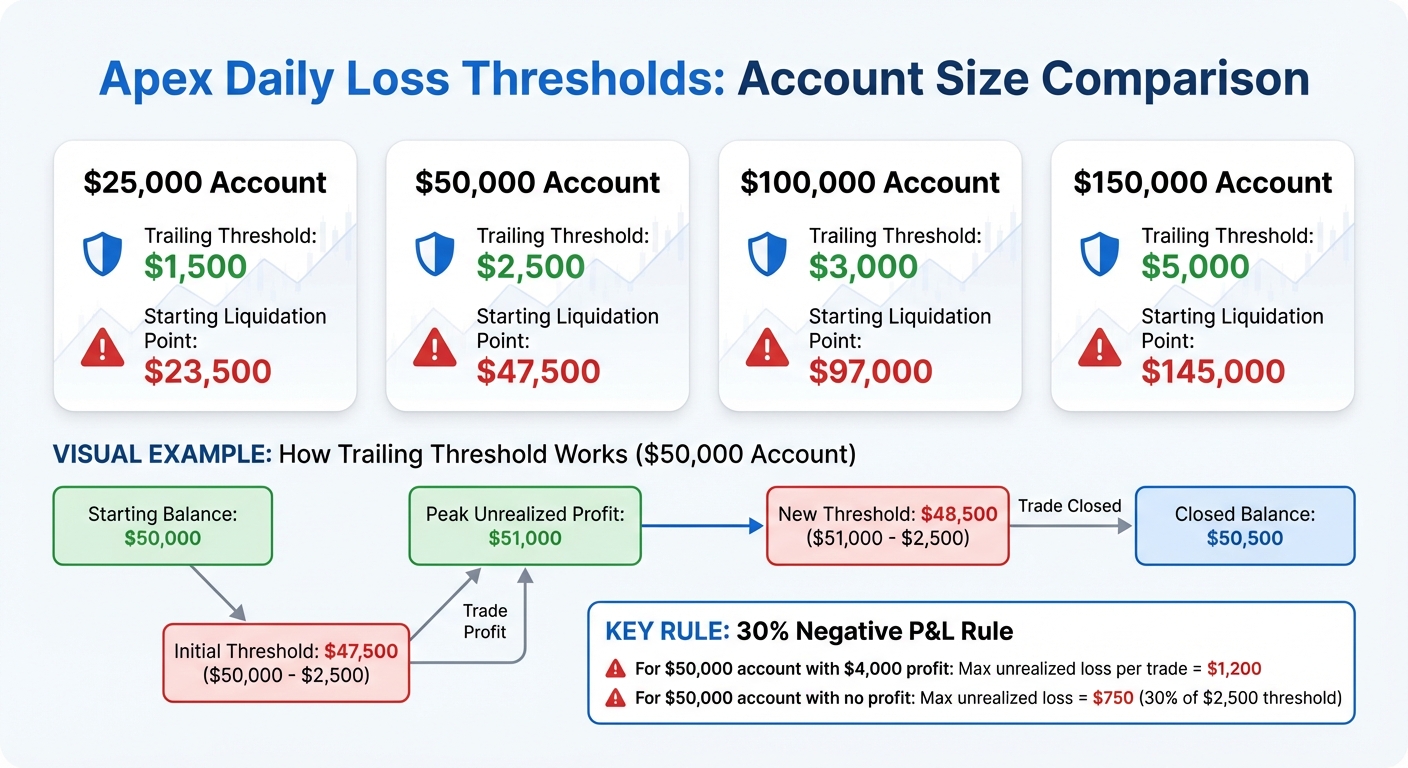
Apex operates with a trailing threshold rather than a traditional 24-hour reset loss limit [6]. This threshold dynamically tracks your account's peak unrealized equity in real time [6][7]. As your account gains value, the threshold moves up but never drops back down. For example, with a $50,000 account, the threshold begins at $47,500 - $2,500 below your starting balance. If your account balance, including open positions, hits this threshold, the account automatically fails.
"There is no daily max drawdown limit." – Apex Support [6]
The trailing threshold adjusts based on the highest unrealized profit during a trade, not just on closed profits. So, if a trade reaches a $1,000 unrealized profit at its peak but you close it with only $200 in profit, the threshold still increases based on the $1,000 peak.
In performance accounts, the trailing process stops once it reaches the "Safety Net" (e.g., $50,100 for a $50,000 account), freezing the threshold at that point. On the other hand, static accounts maintain a fixed drawdown level throughout. This difference highlights Apex's approach to risk management across various account types.
Daily Loss Threshold Calculation Examples
Here's how the trailing thresholds are calculated for different account sizes:
| Account Size | Trailing Threshold Amount | Starting Liquidation Point |
|---|---|---|
| $25,000 | $1,500 | $23,500 |
| $50,000 | $2,500 | $47,500 |
| $100,000 | $3,000 | $97,000 |
| $150,000 | $5,000 | $145,000 |
Example 1: $50,000 Account
Imagine your $50,000 account reaches a peak of $51,000 in unrealized profit but closes at $50,500. In this case, your new threshold becomes $48,500, calculated as $51,000 minus the $2,500 trailing amount.
Example 2: $100,000 Account
Starting with a $100,000 balance and a $97,000 threshold, you earn $2,000, bringing your balance to $102,000. The threshold adjusts accordingly to $99,000 (the new balance minus the $3,000 trailing threshold).
Apex also applies a 30% Negative P&L Rule [2][3]. For a $50,000 account with $4,000 in profit, this rule means that no single trade can have an unrealized loss exceeding $1,200. In accounts with little to no profit, this limit is based on the trailing threshold. For instance, in a $50,000 account, the limit would be $750 (30% of the $2,500 trailing threshold).
How to Stay Within Daily Loss Limits
Position Sizing and Risk Management
Start each trading day by calculating your 30% risk cap based on your current profit balance or trailing threshold[3]. For instance, if you have a $50,000 account with no profits yet, your risk cap would be $750. As your profits grow, so does your cap - for example, $900 at $3,000 profit or $1,500 at $5,000 profit[1].
Stick to Apex's scaling rules until you reach your safety net. For a $50,000 account, begin with 5 contracts, which is half the maximum allowed size. Once your balance surpasses $52,600, you can increase to the full 10-contract limit[1]. If profits are minimal, use micro contracts to fine-tune your position sizing[3].
Apex also enforces a strict 5:1 risk-to-reward ratio. This means you should never risk more than $500 to make $100[1]. To adhere to this rule, calculate your stop-loss distance before entering a trade. Then, determine the number of contracts you can trade without exceeding the 30% cap. These practices create a solid framework for managing your real-time profit and loss (P&L) and staying compliant throughout the day.
Real-Time P&L Monitoring
The trailing threshold is tied to your peak unrealized profit, not your closing balance[5]. Keep a close eye on open positions - any reversal in a winning trade can quickly reduce your drawdown margin.
To safeguard your gains, use ATM strategies that automate stop-loss and profit targets in real time[2]. Platforms like RTrader let you monitor metrics directly under "Risk Parameters"[8]. Hard stop-losses are mandatory for traders on probation and strongly recommended for everyone else. Relying solely on mental stops can leave you vulnerable during volatile market swings[2].
If your drawdown approaches the 30% limit, take immediate action to close or adjust your positions[2]. Keep in mind that the 30% rule isn't a one-time daily limit - it can be approached multiple times in a single day, provided you manage your trades carefully and avoid exceeding it[1][2].
Using TraderVPS for Low-Latency Execution
Effective P&L monitoring is only part of the equation - executing orders with minimal latency is just as critical. In volatile markets, slippage can push you past the 30% P&L threshold before your stop-loss is triggered. TraderVPS offers ultra-low latency servers to ensure your stop-loss orders are executed at the intended price. This precision is vital for exiting trades at peak profit levels before reversals shrink your trailing drawdown margin[10][11].
To stay compliant, manually close all trades by 4:59 PM ET and cancel any pending orders[10]. A reliable VPS connection reduces the risk of local internet issues that could prevent you from meeting this deadline. TraderVPS provides 99.9%+ uptime across its plans, with pricing ranging from $69/month for the VPS Lite plan to $299/month for dedicated servers. This ensures a stable connection for timely trade exits.
Maintaining the 5:1 risk-to-reward ratio also depends on precise stop-loss execution. With low-latency infrastructure, your stop-loss orders are filled as intended, helping you stick to your position sizing plan and avoid accidental rule violations. This combination of precise execution and disciplined risk management supports your efforts to stay within daily loss limits while trading effectively.
What Happens When You Exceed Daily Loss Thresholds
Impact on Funded Accounts
Exceeding the trailing threshold has immediate consequences for funded accounts. The account is terminated, and all open positions are liquidated once your balance drops below the drawdown limit. This results in the loss of both your account balance and any accumulated profits [2][6].
If you have any pending payout requests, they will be canceled. However, approved payouts will still be processed [8].
"Violating these rules can result in denied payouts and even account closure, so it's essential to understand and follow them carefully." - Apex Trader Funding [2]
Severe violations, such as using unauthorized automation tools or engaging in manipulative contract sizing, lead to permanent account closures [2]. On the other hand, standard risk violations, like triggering the trailing threshold, typically allow you to start over with a new evaluation account. Apex also permits traders to manage up to 20 funded accounts simultaneously, offering flexibility for those looking to recover and continue trading [9].
These consequences highlight the importance of maintaining strict discipline. Up next, let’s explore how to recover funding after a breach.
How to Recover After a Breach
When a funded account is breached, it is permanently closed [8]. To regain funding, you’ll need to purchase a new evaluation account and successfully pass the evaluation phase again [4][8]. Strengthen your trading discipline by adhering to the risk management strategies discussed earlier. Apex often provides promotional offers for evaluation resets, such as "Half Price for Resets" deals, which can help reduce the cost of starting over [8].
To avoid future breaches, focus on improving your trading discipline. Here are a few strategies to consider:
- Use mandatory hard stop-loss orders to limit potential losses.
- Stick to a 5:1 risk-to-reward ratio. For instance, aim for a 10-tick profit with a stop loss capped at 50 ticks.
- Implement ATM (Automated Trade Management) strategies to automate stop-loss and profit targets.
- Keep a close watch on your unrealized P&L, as the trailing threshold adjusts based on your peak unrealized balance [2][5].
Conclusion
Sticking to Apex's daily loss thresholds is a critical factor in avoiding a forced account reset. The trailing threshold adjusts in real-time based on your peak unrealized profit, meaning your liquidation point can shift even while trades are active. To steer clear of unexpected account closures during market swings, it's wise to keep a $100–$300 cushion above your Auto Liquidate Threshold.
At the heart of your trading strategy are the principles we've discussed. Rules like the 5:1 risk-reward ratio and the 30% Negative P&L limit per trade aren't random - they're strategic. As Apex Trader Funding explains:
"Responsible, disciplined trading is the key to long-term success. Our consistency rules... are not just about limitations; they are about creating a strong foundation for you to grow and thrive as a trader" [2].
These rules transform reckless trading into a measured, sustainable approach - essential when you're keeping 100% of your first $25,000 in profits and 90% of the profits after that [8][9].
The Safety Net feature in Performance Accounts offers an added layer of stability once your trailing drawdown locks in place. This safeguard reflects Apex's focus on promoting sustainable and disciplined trading practices.
FAQs
What happens if I go over the daily loss limit in my Apex account?
If your Apex account surpasses the daily loss limit, it will fall below the required drawdown threshold. This can result in a failed evaluation and may even lead to the termination of your account.
To prevent this, keep a close eye on your trades and follow risk management strategies that comply with Apex's guidelines. By staying within the established limits, you safeguard your account and maintain your ability to trade efficiently.
How does the trailing threshold adjust based on my account balance?
The trailing threshold adjusts upward in real time as your account balance hits new highs. It remains a fixed amount below your peak balance, based on the size of your account. Here’s how it works:
- $1,500 below a $25,000 balance
- $2,500 below a $50,000 balance
- $3,000 below a $100,000 balance
- $5,000 below a $150,000 balance
- $6,500 below a $250,000 balance
- $7,500 below a $300,000 balance
This setup helps manage risk while giving your account room to grow. Importantly, the threshold only moves upward - it doesn’t decrease, even if your balance drops.
How can I avoid violating the 30% Negative P&L Rule in my funded account?
To steer clear of breaching the 30% Negative P&L Rule, it's all about practicing disciplined risk management. Start by using tight stop-losses and sticking to a maximum 5:1 risk-to-reward ratio. Keep your position sizes conservative - no more than half the allowed contracts - until you've surpassed the trailing threshold.
Monitor your unrealized losses closely throughout the trading day. If any trades begin to push near the 30% limit, either scale back your positions or close them immediately. To help you stay within the limits, consider setting alerts or building a daily profit buffer to ensure your open losses never cross 30% of your starting profit balance. Staying vigilant and proactive with these strategies is essential for protecting your funded account.