TradingView-Compatible Prop Futures Firms
Looking for prop futures firms that work with TradingView? Here’s a quick guide to five firms offering TradingView integration for seamless trading and analysis. These firms provide traders with access to capital without risking their own funds, profit splits up to 90%, and fast payouts.
Key Takeaways:
- MyFundedFutures (MFFU): Easy TradingView setup, multiple account tiers, 80/20 profit splits, and same-day payouts.
- Take Profit Trader (TPT): Affordable evaluation fees, "Day 1" payouts, and up to 90/10 profit splits on PRO+ accounts.
- Apex Trader Funding: High discount promotions, 100% of the first $25,000 in profits, and scalable account options.
- Elite Trader Funding (ETF): Five evaluation models, 90/10 splits after $12,500, and fast scaling plans.
- TradeDay: Focused on mentorship, "Day 1" payouts, and 90/10 splits with potential to increase to 95%.
Quick Comparison:
| Firm | Profit Split | Payout Speed | Account Sizes | Evaluation Process |
|---|---|---|---|---|
| MyFundedFutures | 80/20 | Same-day payouts | $50K–$150K | Strict, 50% consistency |
| Take Profit Trader | 80/20–90/10 | Day 1 payouts | $25K–$150K | One-step, 50% rule |
| Apex Trader Funding | 100% first $25K | 8-day cycle | $25K–$300K | Scalable, 7-day min. |
| Elite Trader Funding | 90/10 after $12.5K | 8-day cycle | $10K–$300K | Five flexible models |
| TradeDay | 90/10–95/5 | Day 1 payouts | $50K–$150K | Mentorship-focused |
Each firm connects to TradingView via Tradovate, enabling real-time execution and analysis. Choose based on your priorities - be it fast payouts, scaling potential, or mentorship support.
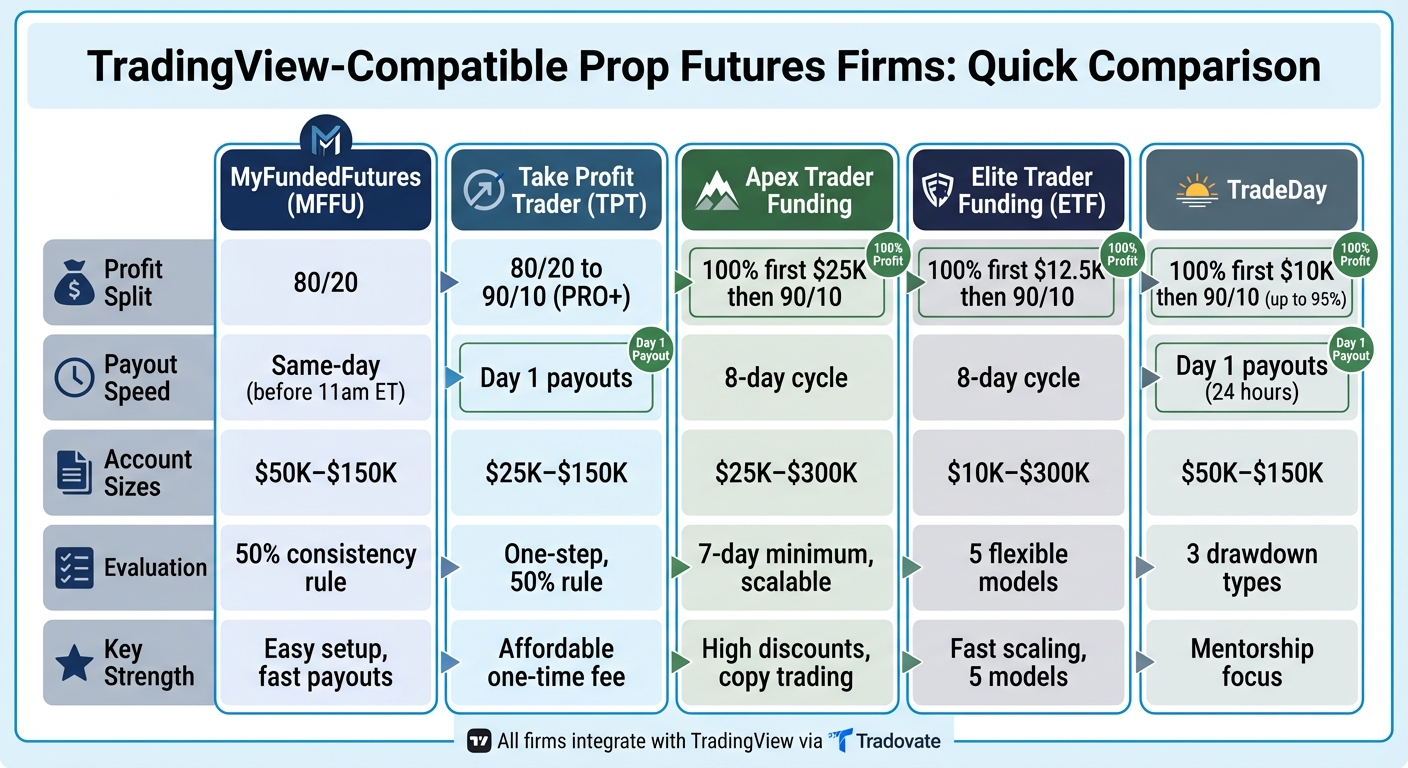
TradingView-Compatible Prop Futures Firms Comparison Chart
How To Trade On Tradingview/Tradovate With Futures Prop Firms | (Topstep, Apex, MFF)

1. MyFundedFutures (MFFU)
MyFundedFutures has become a prominent player in the futures prop trading world, with a user base exceeding 70,000 traders [6]. The firm stands out for its straightforward rules, fast withdrawals, and seamless integration with TradingView.
TradingView Integration
MFFU leverages the Tradovate infrastructure to connect directly with TradingView. Traders can log in to the TradingView "Trading Panel" using their Tradovate credentials, which are accessible through the MFFU dashboard. This setup allows for direct order execution across platforms like TradingView, Tradovate, NinjaTrader, and Quantower - no need for third-party tools or extra configurations [1][5].
"MyFundedFutures offers one of the most seamless TradingView integrations available to futures traders. The process requires no third-party portals or additional configuration." – MyFundedFutures Blog [1]
Before trading, you’ll need to sign exchange agreements on the Tradovate web platform to access live market data [3]. Once the integration is active, it syncs real-time data and tracks positions across all your devices.
For placing trades, the platform provides tools like the "Long/Short Position Tool", which lets you set entry, stop loss, and take profit levels simultaneously. Alternatively, you can use "Quick Market Entry" buttons for faster execution [4]. Just make sure to use the correct futures symbol (e.g., ESZ2025) instead of continuous contracts (ES1!) to avoid routing errors [1].
This integration simplifies the trading experience and supports flexible account options suited to various trading preferences.
Account Options
MFFU offers multiple account tiers designed to fit different trading strategies and capital requirements. These include the Starter, Expert, Scale, and Milestone (Lifetime) plans [6][7], with account sizes ranging from $50,000 to $150,000 [9]. Among these, the Scale Account stands out for its affordability and clear pathway to live funding after achieving five consecutive payouts [1].
The evaluation process is straightforward, featuring a 50% consistency rule. Some traders can even pass the evaluation phase in as little as two days [6]. Notably, around 28.56% of traders in the simulated Funded Stage manage to secure at least one payout [1].
Profit Splits
MFFU offers an 80/20 profit split across all account plans, meaning traders retain 80% of the profits they generate [6][8]. During the Sim Funded phase, traders can request payouts up to a maximum of $100,000 [6]. After completing five payouts in the simulated phase, they gain access to a live funded account [8].
Payout Speed
Payout schedules vary depending on the account plan. The Rapid Plan allows daily payouts, available just 24 hours after the first trade [8]. Core and Scale Plans offer weekly payouts, while the Pro Plan operates on a 14-day payout cycle [8].
"MFFU processes most payouts within the same day when requested before 11 a.m. ET." – MyFundedFutures Blog [1]
2. Take Profit Trader (TPT)
Take Profit Trader stands out with its focus on "Day One" payouts and a simplified evaluation process. With a solid Trustpilot rating of 4.4/5 from 7,846 reviews [10], it appeals to traders looking for quick access to their earnings without enduring long waiting periods.
TradingView Integration
TPT connects seamlessly with TradingView using Tradovate-backed infrastructure. To get started, traders simply select "Tradovate" in the TradingView Trading Panel and log in with credentials provided by TPT. This setup allows users to place orders directly from TradingView charts, access live market data, and track positions in real time. Whether you’re using a simulated PRO account or a live PRO+ account, the integration ensures smooth functionality. Just remember to select the Tradovate data feed during signup to make the most of these features.
This streamlined connection supports TPT's broader account offerings, making it easy to dive into trading with efficiency.
Account Options
TPT uses a straightforward, one-step evaluation process for accounts ranging from $25,000 to $150,000. The evaluation requires a minimum of five trading days and adherence to a 50% consistency rule - no single trading day can account for more than half of your total profit target [10][11]. Between January 1, 2023, and August 31, 2023, 20.37% of users passed the evaluation, though the pass rate dipped to 16.86% in 2024 [12].
| Account Size | Profit Target | Max Position Size | Max Trailing Drawdown (EOD) |
|---|---|---|---|
| $25,000 | $1,500 | 3 Contracts | $1,500 |
| $50,000 | $3,000 | 6 Contracts | $2,000 |
| $75,000 | $4,500 | 9 Contracts | $2,500 |
| $100,000 | $6,000 | 12 Contracts | $3,000 |
| $150,000 | $9,000 | 15 Contracts | $4,500 |
Once traders pass the evaluation, they transition to a simulated PRO account. High-performing traders can then qualify for a live PRO+ account through Tradovate Brokerage. PRO accounts feature an intraday trailing drawdown, while PRO+ accounts switch to End-of-Day (EOD) drawdown rules. Additionally, TPT allows traders to manage up to five active PRO or PRO+ accounts simultaneously [10][11].
Evaluation fees range from $150 per month for a $25,000 account to $360 per month for a $150,000 account. Upon passing, a one-time activation fee of $130 is required [10][11]. This process highlights TPT's focus on offering traders immediate rewards, underscored by its "Day One" payout feature.
Profit Splits
After setting up an account, traders benefit from favorable profit-sharing terms. PRO accounts offer an 80/20 split, while upgrading to PRO+ increases the split to 90/10 and removes buffer requirements. For PRO accounts, traders must meet a buffer threshold before withdrawals - e.g., a $50,000 PRO account requires reaching $52,000 to withdraw profits at the full 80% rate [13].
"In the PRO account, the profit split is 80/20, where the trader keeps 80% of the profits." – Take Profit Trader Help Center [13]
Payout Speed
One of TPT's standout features is its "Day One" payout policy. Once traders meet PRO account criteria and buffer requirements, they can request withdrawals immediately [10][11]. Most withdrawals are processed within one business day through Plaid (for U.S. bank accounts), PayPal, or Wise [10].
"When you make it on day one you can take it on day one. There's no withdrawal restrictions on your profits above the buffer." – Take Profit Trader [10]
This quick payout system sets TPT apart from firms that require 20–60 trading days before allowing withdrawals. With commissions of $5 per round trip for standard contracts and $0.50 for micros [11], TPT's payout model aligns perfectly with the efficiency of TradingView’s integrated interface, giving traders both speed and convenience.
3. Apex Trader Funding

Since 2022, Apex Trader Funding has paid out over $632 million, averaging $15.9 million in monthly payouts since January 2023 [14]. The firm offers integration with TradingView through Tradovate-backed accounts, making it a popular choice among traders.
TradingView Integration
Apex seamlessly connects with TradingView using Tradovate credentials. To get started, traders must select a Tradovate account during the signup process, as Rithmic-based accounts are not supported. Once Apex provides your Tradovate login details, you’ll need to enable the TradingView add-on in the Tradovate settings. This allows you to place trades directly from TradingView charts, with real-time data syncing across web, mobile, and desktop platforms. When setting up your charts, make sure to select specific contract months (e.g., ESZ5) rather than continuous symbols like ES1!.
This streamlined integration simplifies trading while ensuring a smooth experience across devices.
Account Options
Apex offers a straightforward one-step evaluation process, requiring a minimum of seven trading days to pass. Account sizes range from $25,000 to $300,000, with profit targets between $1,500 and $20,000. The firm uses a trailing drawdown system, which adjusts upward as your account balance grows.
| Account Size | Profit Target | Trailing Drawdown | Max Contracts (Full/Micros) |
|---|---|---|---|
| $25,000 | $1,500 | $1,500 | 4 (40 Micros) |
| $50,000 | $3,000 | $2,500 | 10 (100 Micros) |
| $100,000 | $6,000 | $3,000 | 14 (140 Micros) |
| $150,000 | $9,000 | $5,000 | 17 (170 Micros) |
| $250,000 | $15,000 | $6,500 | 27 (270 Micros) |
| $300,000 | $20,000 | $7,500 | 35 (350 Micros) |
Evaluation fees start at $196 per month, but Apex frequently runs promotions with discounts of 80%–90%. Once you pass the evaluation, there’s a one-time activation fee of $105 for Tradovate-compatible funded accounts, and evaluation resets cost $100.
One standout feature of Apex is its copy trading capability. Traders can manage up to 20 active Performance Accounts under a single user ID, with a maximum allocation of $6,000,000 across all accounts. This makes Apex the only futures prop firm offering this level of scalability [14][15].
Profit Splits
Apex provides a competitive profit-sharing structure. Traders keep 100% of the first $25,000 in profits per account. Beyond this amount, the profit split moves to 90/10, allowing you to retain 90% of all additional earnings [14][15]. This structure, combined with scalable account options, significantly boosts earning potential. In April 2025, a trader known as JadeCap received a record-breaking payout of $2,552,800.50 - the largest single payout in retail prop trading history [15].
Payout Speed
Apex also stands out for its quick payout process. The firm operates on an eight-day payout cycle. To request a withdrawal, traders must complete at least eight trading days, including five profitable days (with a minimum of $50 profit each). Withdrawal requests are reviewed within two business days, and funds are typically transferred within an additional three to four business days. The minimum withdrawal amount is $500 for all account sizes.
For the first three payouts, traders must maintain a "safety net" balance equal to the drawdown amount plus $100. Additionally, the first five payouts are capped based on account size - ranging from $1,500 for a $25,000 account to $3,500 for a $300,000 account. From the sixth payout onward, there are no caps. However, no single trading day can account for more than 30% of your total profit at the time of a payout request [15].
4. Elite Trader Funding (ETF)
Elite Trader Funding (ETF) has paid out over $10 million to traders since its debut in February 2022 [17]. What sets this firm apart is its variety of five evaluation models and seamless TradingView integration using Tradovate credentials.
TradingView Integration
ETF integrates with TradingView through your Tradovate credentials, making it possible to trade directly from TradingView charts. To enable this, activate the TradingView add-on within your Tradovate settings. While continuous tickers like NQ!, ES1!, or NQ2! aren't supported, you can trade specific contract expiration months (e.g., NQZ2025 or ESZ5). The integration supports various order types, such as market, limit, and stop orders, and even allows you to test strategies using TradingView's paper trading feature. However, avoid logging into both Tradovate and TradingView simultaneously - if the connection drops, you’ll need to manage your positions via Tradovate [16].
This integration complements ETF’s diverse evaluation models, which are outlined below.
Account Options
ETF offers a range of evaluation models designed for different trading styles. These include:
- 1-Step (Standard)
- EOD Drawdown (Swing)
- Fast Track (High-risk sprint)
- Static Drawdown (Fixed safety net)
- Diamond Hands (Overnight/Weekend holding)
Account sizes range from $10,000 to $300,000, giving traders access to 76 futures contracts across various markets like currencies, cryptocurrencies, stocks, metals, and energy [2]. Fees start at $77 per month for a $10,000 Static account, while a $100,000 1-Step or EOD account costs $235 monthly. Sim-Funded accounts come with an $80 monthly activation fee and $75 reset fees, though resets are free with a subscription renewal. Additionally, you can manage up to 20 accounts under one login [17].
Profit Splits
Traders keep 100% of their first $12,500 in profits. After that, profits are split 90/10 [17].
Payout Speed
To qualify for a payout, you must complete at least eight active trading days. An active day is defined as earning at least $200 in realized profit (or $100 for smaller accounts) and hitting at least 23% of your best trading day's P&L. There's also a 40% consistency rule, meaning no single day can account for more than 40% of your total profits at the time of withdrawal.
ETF has earned a 4.1/5 rating on Trustpilot from 1,174 reviews, with many traders commending its fast payout process for Sim-Funded accounts and flexible platform options. Support is available Monday through Friday, from 8:00 AM to 4:00 PM Central Time, through a ticket-based system [17].
5. TradeDay

TradeDay brings together advanced trading tools and a robust mentorship program to support traders at every level. With a 4.6/5 rating on Trustpilot from 1,263 reviews, users frequently highlight the platform's quick payout system and flexible account choices as standout features [18]. The combination of mentorship and cutting-edge technology reflects the evolving expectations of modern traders.
TradingView Integration
TradeDay integrates seamlessly with TradingView, using Tradovate as its underlying platform. This setup allows both evaluation and funded traders to connect their accounts by logging into the Trading Panel with Tradovate credentials. Through this integration, traders can execute orders, manage positions, and access real-time analytics directly from their charts [1]. This streamlined approach enhances the platform's usability and complements its flexible account structure.
Account Options
TradeDay offers three distinct drawdown types for its evaluation accounts: Intraday Trailing Maximum Drawdown (TMD), End of Day (EOD) TMD, and Static Drawdown. Account sizes are available at $50,000, $100,000, and $150,000, with pricing starting at $75 per month for a $50,000 Intraday account and going up to $225 per month for a $150,000 EOD account.
The Static Drawdown option sets a fixed maximum loss limit that doesn't change as the account grows, catering to traders who prefer more predictable risk management. For those not ready to take on an evaluation account, the CoPilot membership, priced at $24 per month, provides access to educational resources and webinars. Between October 2023 and March 2024, the trader pass rate stood at 28.2%. Additionally, traders can manage up to six accounts simultaneously, and once funded, the monthly membership fee is waived [18][19].
Profit Splits
TradeDay offers an attractive profit-sharing structure. Traders keep 100% of their first $10,000 in profits. After that, the split adjusts to 90/10 in favor of the trader, with the potential to increase to 95% based on performance. Notably, the 30% consistency rule applied during the evaluation phase is removed once funding is secured, giving traders full flexibility to withdraw their profits without restrictions [18][20].
Payout Speed
One of TradeDay's standout features is its "Day 1" payout eligibility. Traders can request withdrawals starting from their first day of trading. Payouts are processed daily and typically completed within 24 hours. There are no limits on how often or how much traders can withdraw, apart from maintaining a $250 profit buffer. Moreover, as of early 2026, activation fees for funded accounts have been eliminated, adding even more value for traders [18][20].
Pros and Cons
Here’s a breakdown of how each firm integrates with TradingView, highlighting their strengths and weaknesses.
All five firms - MyFundedFutures, Take Profit Trader, Apex Trader Funding, Elite Trader Funding, and TradeDay - use Tradovate as a bridge to facilitate real-time trade execution directly from TradingView. This integration allows traders to seamlessly chart and execute trades within a single platform.
MyFundedFutures stands out for its easy setup process and same-day payout option if requested before 11:00 a.m. ET. However, its evaluation process is tough. Between January 1, 2024, and July 1, 2025, only 20.35% of accounts met their objectives, and just 1.01% of traders advanced to live-capital status[1].
Take Profit Trader offers an affordable PRO account with a one-time fee, eliminating monthly charges - a great option for long-term traders[1]. Apex Trader Funding is popular for its frequent high-discount promotions, although some users have reported occasional performance issues due to data load or browser settings[1].
Elite Trader Funding provides fast scaling plans, but traders must manually select specific contract months (e.g., ESZ5) instead of using continuous symbols. Meanwhile, TradeDay focuses on education and mentorship, paired with reliable Tradovate integration. However, its scaling process is slower compared to some competitors[1].
"Integration quality matters as much as the platform itself. Poor broker integration can lead to connection errors, delayed fills, or missing account data."
– MyFundedFutures[1]
Here’s a quick comparison of each firm's standout feature and main drawback:
| Firm | Key Strength | Key Weakness |
|---|---|---|
| MyFundedFutures | Easy setup; Same-day payouts | Strict evaluation process |
| Take Profit Trader | One-time fee PRO account | - |
| Apex Trader Funding | Frequent high-discount offers | Occasional performance issues |
| Elite Trader Funding | Fast scaling plans | Requires manual contract month selection |
| TradeDay | Focus on education and mentorship | Slower scaling process |
For traders using automated strategies, minimizing latency is crucial. Automated TradingView strategies can benefit from a Chicago-based VPS, which reduces CME latency to under 1 millisecond. This setup is ideal for high-frequency and scalping strategies, as it helps limit slippage[21].
Conclusion
Each firm brings something different to the table, catering to a variety of trading styles and priorities. Choosing the right one comes down to what fits your specific needs. For instance, MyFundedFutures stands out with its seamless integration using direct Tradovate credentials and same-day payouts for requests made before 11:00 a.m. ET.
If you're budget-conscious, Take Profit Trader offers a one-time PRO account fee, making it a cost-effective choice. Meanwhile, Apex Trader Funding is appealing for high-volume traders, thanks to frequent 80–90% discount deals. However, keep in mind that performance might occasionally dip during heavy data loads. For traders looking for rapid scaling, Elite Trader Funding is a solid option, though it requires manual contract month selection instead of continuous symbols. On the other hand, TradeDay is ideal if you're focused on education and mentorship, as it provides strong resources for long-term growth. That said, its scaling process is slower compared to others.
For those running automated strategies or requiring ultra-low latency, pairing your chosen firm with a Chicago-based VPS can be a game-changer. This setup achieves sub-0.52ms CME latency, significantly reducing slippage for scalping and high-frequency trading strategies[22].
Ultimately, your choice should align with your specific priorities - be it fast payouts, affordability, scaling options, or educational support. Don’t forget to test the connection quality beforehand to ensure you're making the most of your investment.
FAQs
What are the advantages of using a prop futures firm with TradingView integration?
Using a prop futures firm that works seamlessly with TradingView can make trading much more efficient. This setup lets you execute, adjust, and close trades directly from the TradingView charts you’re already familiar with - no need to jump between different platforms. Plus, all your custom indicators, chart templates, and alert settings stay exactly as they are, keeping your workflow smooth and uninterrupted.
TradingView brings a lot to the table, offering a rich library of technical indicators, handy drawing tools, and real-time market data to sharpen your trading skills. Beyond the tools, its social features let you connect with other traders, exchange ideas, and fine-tune your strategies. To make things even better, many prop firms integrate risk management tools - like daily loss limits and profit targets - right into the platform. This ensures you can trade confidently while staying within the firm’s guidelines, whether you’re on your computer or mobile device. It’s all about creating a faster, more focused trading experience that works for you.
How do profit splits and payout speeds vary across TradingView-compatible prop futures firms?
Profit-sharing arrangements can vary widely across trading firms. For instance, PropFirm.com begins with a 50:50 split but may increase it over time. On the other hand, firms like Take Profit Trader, BluSky Trading, and Earn2Trade generally offer splits in the range of 80% to 90%. Apex Trader Funding and Elite Trader Funding take a unique approach by allowing traders to keep 100% of their first $12,500 to $25,000 in profits before switching to a 90% profit split.
When it comes to payout speeds, the differences are just as notable. Take Profit Trader supports immediate withdrawals, offering traders quick access to their earnings. PropFirm.com provides fast, borderless payouts in USDT, catering to those who prefer cryptocurrency transactions. Meanwhile, firms like ThinkCapital follow a weekly payout schedule, and most others process withdrawals within a few business days. These variations can be a deciding factor for traders who value fast access to their profits.
What should I look for in a prop futures trading firm that works with TradingView?
When selecting a proprietary futures trading firm that works with TradingView, the first thing to consider is how well the platform integrates. Some firms might only provide basic charting options, while others let you execute, modify, and close trades directly on TradingView. A smooth integration minimizes delays, keeps distractions at bay, and allows you to focus entirely on your trading analysis.
Next, take a close look at the firm’s trading rules and risk management features. Whether you prefer scalping, news trading, or using automated systems, it’s important to find a firm that supports your style. At the same time, tools like daily loss limits, profit targets, and drawdown controls are crucial for staying within the firm's guidelines while managing your risk responsibly.
Lastly, don’t overlook payouts, profit-sharing, and support. Quick payouts in U.S. dollars, equitable profit splits, and responsive customer service can make a huge difference in your trading experience. A firm that offers dependable technology, clear terms, and strong support will allow you to fully leverage TradingView’s capabilities for futures trading.