NinjaTrader 2026 Insights: Benefits, Downsides, and Trader Feedback
NinjaTrader remains a popular choice for futures traders in 2026, offering fast execution, custom tools, and competitive pricing. Here's what you need to know:
- Key Features: NinjaTrader delivers execution speeds averaging 0.3 seconds, advanced charting tools, and a powerful SuperDOM for one-click order placement. It supports over 1,000 third-party add-ons and custom automation via NinjaScript.
- Pricing: Offers a free plan, $99/month subscription, or $1,499 lifetime license. Commissions range from $0.09 to $1.29 per contract, with additional fees for market data and inactivity.
- Performance: Works best with a VPS (like TraderVPS) for low latency and reliability, especially for automated strategies.
- Challenges: Steep learning curve, limited mobile app functionality, and Windows-only design. Mac users need virtualization or a VPS.
For high-volume traders and those using automation, NinjaTrader paired with a VPS offers strong performance. However, beginners may find the platform complex and costly due to additional fees.
NinjaTrader Review | Is It The Best Futures Trading Platform in 2026?

Trading Features and Performance
NinjaTrader's SuperDOM acts as a command hub, offering one-click order execution, live bid/ask visualization, and instant ATM strategy deployment - particularly useful in fast-paced markets like CME openings. The platform's Order Flow+ suite enhances market insights with tools such as Volume Profile, VWAP, Cumulative Delta, and footprint charts. Professional testing reveals an average execution speed of just 0.3 seconds, significantly faster than the typical 1–2 seconds seen with many retail brokers [3]. To achieve such performance, a solid technical foundation is essential.
That’s where TraderVPS steps in. By hosting servers near major exchanges like the CME, TraderVPS minimizes transmission delays and slippage. This infrastructure ensures automated NinjaScripts remain operational even during local internet issues or power outages. For CME futures traders, a VPS located in Chicago can achieve latency under 1 millisecond - compared to the hundreds of milliseconds often experienced with standard home connections [5].
"A local machine - even a fast one - can't match the reliability and low-latency performance of a dedicated NinjaTrader VPS." – TraderVPS [9]
For traders using demanding setups - like multi-timeframe charting, Order Flow+ tools, and advanced indicators - high-performance VPS hardware is critical. Systems powered by AMD Ryzen 9950X processors, with boost clocks reaching 5.7 GHz, excel at handling NinjaTrader's single-threaded order logic efficiently [6]. Additionally, VPS setups with multi-monitor support allow traders to spread out SuperDOM, tick charts, and news feeds across multiple screens without being limited by local hardware [5].
TraderVPS offers scalable plans to suit a variety of trading needs. For example:
- VPS Lite ($69/month): Includes 4 cores, 8GB RAM, and supports 1–2 charts.
- Dedicated Servers ($299/month): Designed for power users with 12+ cores, 128GB RAM, support for 7+ charts, and up to 6 monitors.
This synergy between NinjaTrader's lightning-fast execution and TraderVPS's reliable hosting ensures a seamless experience for traders. Whether you're running automated strategies or managing resource-heavy setups, this combination provides the stability and speed needed to stay connected to the market at all times.
Pricing and Costs
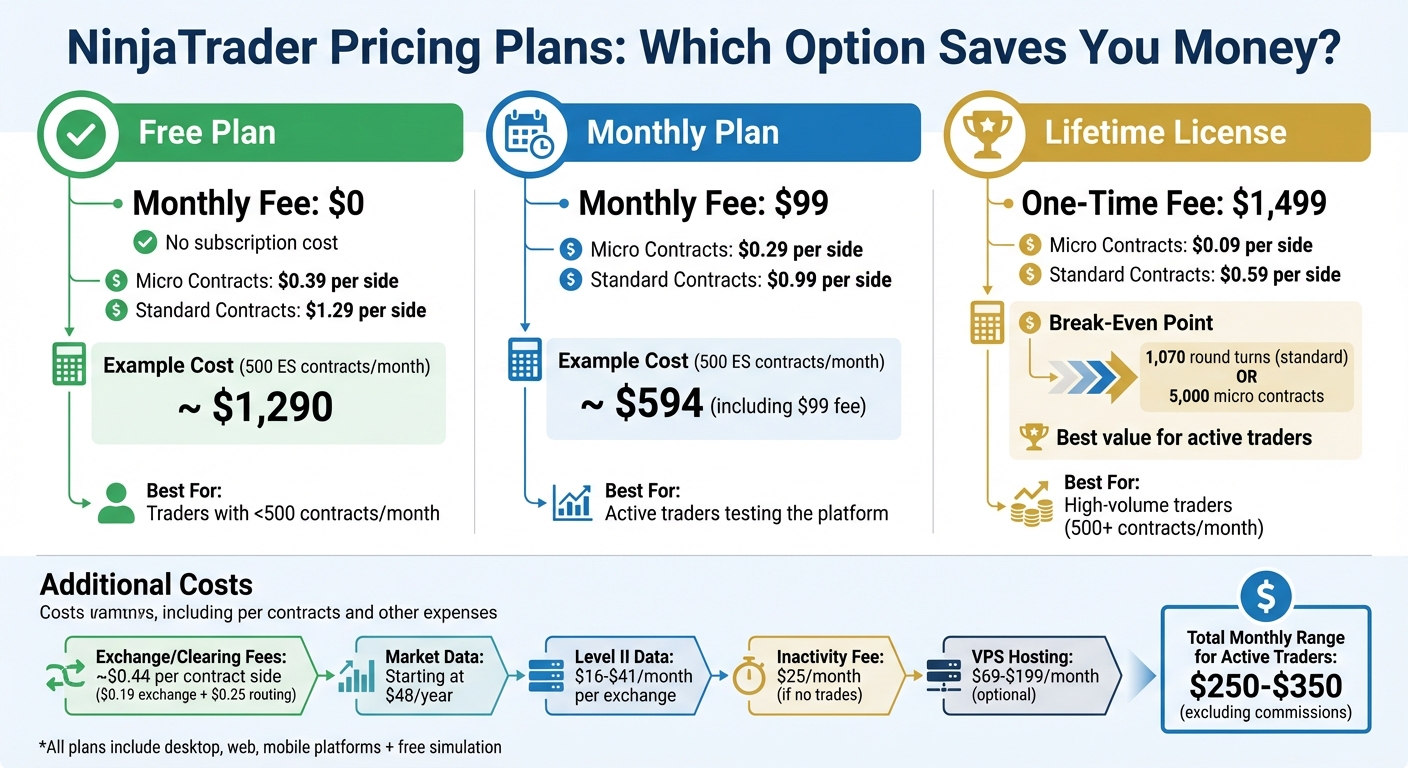
NinjaTrader 2026 Pricing Plans Comparison: Free vs Monthly vs Lifetime License
NinjaTrader offers a three-tier pricing structure aimed at rewarding traders with higher volumes [12]. Here's how it breaks down:
- Free Plan: Charges are per contract only - $0.39 per side for micro contracts and $1.29 for standard contracts.
- Monthly Plan: Costs $99 per month and reduces rates to $0.29 per side for micros and $0.99 for standard contracts.
- Lifetime License: Requires a one-time payment of $1,499 and offers the lowest rates, with $0.09 per side for micros and $0.59 for standard contracts.
All plans include access to desktop, web, and mobile platforms, along with free simulated trading and advanced charting tools [12]. These options allow traders to weigh their total trading costs, factoring in additional expenses like VPS hosting and market data subscriptions.
On top of these rates, traders face an extra fee of about $0.44 per contract side ($0.19 for exchange/clearing fees and $0.25 for order routing via CQG or Rithmic) [1]. Market data subscriptions are also required for live trading, starting at approximately $48 annually, with Level II data costing Level II data costing $16–$41 monthly.6–$41 monthly. Additionally, a $25 monthly inactivity fee applies if no trades are made [3][13][14].
"The Lifetime License offers the best value for high-volume traders, though the break-even point depends on your asset class." – Steven Hatzakis, Global Director of Online Broker Research [1]
For example, a trader handling 500 ES contracts per month would pay about $1,290 in commissions with the Free plan. Opting for the Monthly plan reduces that cost to around $594, including the $99 subscription fee [3]. The Lifetime license becomes cost-effective after roughly 1,070 round turns of standard contracts or 5,000 micro contracts [1]. For traders handling less than 500 contracts per month, the Free plan is generally the most economical choice, as the higher per-contract fees are offset by avoiding the monthly subscription cost [3].
Beyond trading fees, VPS hosting for futures can add to monthly expenses. Factoring in NinjaTrader's Monthly plan and typical market data fees, active traders might expect to spend between $250 and $350 per month for platform access, hosting, and data - excluding per-contract commissions.
Customization and Integration Options
NinjaTrader's NinjaScript framework gives traders access to a C#-based environment, allowing them to create custom indicators, automated strategies, and tools tailored to their needs [15][17]. This built-in integration helps minimize delays in order execution [16]. For those who aren't familiar with coding, the platform offers a point-and-click strategy builder, which lets you design, test, and implement automated systems without touching a single line of code [15][2].
Beyond its core features, NinjaTrader supports over 1,000 third-party add-ons, expanding its capabilities with specialized tools. For instance, you can integrate order flow analysis tools like Jigsaw Trading (priced between $79 and $199 per month) or trade copiers such as Copilink. However, it's wise to test any new add-ons in simulation mode first - buggy indicators can disrupt the platform during live trading sessions [8]. Also, avoid loading templates overloaded with indicators on your VPS, as they can drain CPU and RAM resources, slowing execution [8].
"NinjaTrader's comprehensive and flexible development environment empowers traders to build rich and integrated apps including indicators, trading apps, and automated strategies." – NinjaTrader [15]
For uninterrupted automated trading, a dedicated VPS setup is highly recommended. This ensures low-latency performance and keeps NinjaScript strategies running smoothly, even if your local computer is offline [4].
However, there are a few considerations. NinjaTrader is built specifically for Windows, meaning Mac users will need to use virtualization software or a VPS to access the platform [17]. Additionally, while the C# programming environment is powerful, it comes with a steep learning curve. When working with automated strategies, enabling One-Cancels-Other (OCO) logic is crucial to prevent duplicate order fills [11].
These features and options highlight NinjaTrader's commitment to delivering a highly adaptable and performance-driven trading experience.
Trader Feedback and Performance Reviews
Trader reviews shed light on both the advantages and hurdles of using NinjaTrader. Consistent with earlier evaluations, traders commend the platform's fast execution speeds. The SuperDOM tool, in particular, stands out for its ultra-fast, one-click order entry and cancellation - an essential feature during high-pressure trading moments [1]. Charting tools also receive positive feedback, boasting support for over 14 chart types (like Renko and Kagi) and more than 100 built-in indicators, which traders describe as professional-grade [3][2]. However, not all feedback is glowing, as users highlight some significant challenges.
New users often report needing around 2.5 hours to set up their first functional workspace [3]. As Sam Taube from NerdWallet puts it:
"NinjaTrader offers an information-rich and highly customizable trading platform for experienced futures traders... However, the platform isn't very beginner-friendly" [13].
The desktop version adds to the complexity by requiring manual floating-window setups, which can overwhelm those new to the platform [1].
Another sticking point for users is the unexpected costs. Real-time Level II data fees range from $16 to $41 per month per exchange, and there’s also a $25–$35 monthly inactivity fee for traders who don’t execute any trades. These fees can be frustrating for casual or occasional users [3][7][18]. Additionally, the mobile app is often criticized for its limited functionality. Traders frequently describe it as a "monitor-only" tool due to its lack of robust order modification features and clunky swipe navigation [3][13].
For those using automated trading strategies, some of these issues are mitigated with dedicated VPS solutions. TraderVPS, for example, delivers 99.999% uptime and sub-2ms latency, ensuring seamless operation during critical moments like FOMC announcements. This reliability helps prevent session desynchronization and ATM execution lag. However, high-performance plans come with a price tag of $69 to $199 per month, which can add up for traders already managing data subscriptions and other platform fees [19].
| Aspect | Strengths | Limitations |
|---|---|---|
| NinjaTrader Execution | 0.3s average speed; SuperDOM one-click entry [3][1] | Steep learning curve; 2.5 hours initial setup [3] |
| NinjaTrader Charting | Over 100 indicators; 14+ chart types; NinjaScript [3][19] | Desktop not native to Mac; requires virtualization [1][7] |
| NinjaTrader Costs | Low commissions with Lifetime License ($0.09/micro) [1] | Data fees $4–$41/month; inactivity fee $25–$35/month [3][7][18] |
| TraderVPS Reliability | 99.999% uptime; prevents local hardware/ISP failures [19][20] | Recurring costs $69–$199/month for high-performance [19] |
| TraderVPS Performance | Sub-2ms latency to CME; essential for 24/7 automation [19] | Requires technical setup and maintenance [19] |
Pros and Cons
Here’s a breakdown of NinjaTrader's strengths and limitations:
| Aspect | Pros | Cons |
|---|---|---|
| NinjaTrader Platform | Fast execution[3]; low intraday margins (starting at $50 for micros[2]); access to 1,000+ third-party apps; extensive NinjaScript customization; unlimited demo access | Steep learning curve for beginners; no native Mac compatibility; limited mobile app functionality |
| NinjaTrader Pricing | Lifetime License ($1,499) offers the lowest commissions (as low as $0.09 per micro[1]); multiple pricing options, including a free plan; low ACAT transfer fee ($50) | Additional fees for data and inactivity; 4× margin increase during news events; break-even point requires ~1,070 round turns |
| TraderVPS Integration | Up to 99.99% uptime[10]; sub-2ms latency to CME[10]; 24/7 automated strategy operation; mitigates local hardware risks | Monthly costs ($69–$199); requires technical knowledge; remote access via RDP can feel less user-friendly than native apps |
This table highlights NinjaTrader’s core offerings and their practical trade-offs. For active traders, the platform’s fast execution and deep customization capabilities stand out. Features like the SuperDOM for one-click order entry and the ability to create custom NinjaScripts make it especially appealing for those who trade frequently or rely on automated strategies[1]. However, newcomers might find the setup process overwhelming, especially without prior experience.
When it comes to costs, planning is essential. While NinjaTrader offers a free plan, unlocking its full potential often involves additional expenses, such as lifetime licenses or secure managed VPS hosting subscriptions. Pairing NinjaTrader with TraderVPS can address reliability concerns, ensuring automated strategies operate smoothly. However, this setup adds recurring costs and demands some technical know-how. For traders focused on high-frequency or complex automated strategies, this combination can lead to noticeable performance gains, as discussed in the pricing and customization sections[10].
This summary underscores the platform's advantages and challenges, providing a clear picture of what traders can expect.
Conclusion
NinjaTrader in 2026 continues to cater to futures traders who value speed, customization, and cost efficiency. With industry-leading execution speeds and intraday margins as low as $50 for micro contracts across MES market timings, it’s a powerful tool for experienced traders. However, its steep learning curve and Windows-only desktop software make it less appealing to everyone [3].
For traders executing over 500 contracts monthly, the Lifetime License ($1,499) becomes a cost-saving option, thanks to commission reductions of $0.09 per micro contract [1]. This makes it especially attractive for high-frequency strategies. Algorithmic traders can take advantage of NinjaScript’s C#-based customization and the Strategy Analyzer for backtesting. Pairing NinjaTrader with TraderVPS (plans ranging from $69 to $199 per month) ensures 24/7 automated trading with ultra-low latency. However, this setup demands technical know-how and adds recurring expenses.
Beginners may find the platform challenging. While the free plan and unlimited simulation mode offer a safe space to learn, mastering its features takes time. As Sam Taube from NerdWallet explains:
"The platform isn't very beginner-friendly. The mobile app interface is difficult to navigate if you're a newcomer to futures trading" [13].
New users may also struggle with setup and workspace configuration, which can be daunting.
NinjaTrader’s focus on futures trading means it isn’t ideal for stock, ETF, or options traders. Additional fees apply for certain features [3], and Mac users face limitations unless they use virtualization software or the web platform [1].
FAQs
Which NinjaTrader plan is cheapest for my trading volume?
The cost of a NinjaTrader plan varies based on your trading volume and the features you need. The Free plan is a great starting point for those trading at low volumes or just testing the platform - it doesn’t require any upfront payment but does come with limited features. If you’re trading more frequently, paid options like the Unlimited or Lease plans might be more cost-effective because they offer reduced commission rates. Take a close look at your trading habits to figure out which plan will help you keep your overall expenses as low as possible.
Do I really need a VPS for NinjaTrader automation?
Using a VPS for NinjaTrader automation is an excellent choice. It provides better reliability, lower latency, and ensures a stable system performance during live trading. These advantages are crucial for running automated strategies smoothly and reducing the risk of interruptions.
What extra fees should I budget for beyond commissions?
When planning your trading budget, keep in mind that small deposit fees might apply, depending on your deposit method and currency. The good news? NinjaTrader doesn’t impose account, inactivity, or withdrawal fees. However, some costs may arise from your deposit process. It's a smart move to check the details of your selected payment method to steer clear of unexpected charges.