Ultimate Setup for Stock Trading Computers
When trading stocks or futures, speed and reliability matter. A powerful computer setup can make a huge difference in executing trades faster, reducing slippage, and handling high market volatility. Here's what you need for an optimized trading system:
- Processor (CPU): Choose a high-speed CPU (4.0 GHz or higher). For multi-threaded platforms like NinjaTrader, go for Intel Core i9-14900K or AMD Ryzen 9 chips.
- RAM: Start with 16GB for basic needs; upgrade to 32GB or 64GB for professional multi-monitor setups.
- Storage: Use NVMe SSDs for faster platform loading and data retrieval.
- Graphics Card: NVIDIA cards are ideal for multi-monitor setups (6–8 monitors common for pros).
- Cooling: Invest in quality air or liquid cooling to prevent performance drops during intense trading.
Alternatively, cloud-based solutions like TraderVPS offer enterprise-grade performance with ultra-low latency to exchanges like CME, starting at $69/month. This eliminates the need for hardware maintenance and ensures 99.99% uptime.
Key Takeaway: Whether you choose a high-end desktop or a TraderVPS plan, prioritize speed, multitasking, and reliability to stay ahead in the fast-paced world of trading.
2025 Professional Trading Computer Build Guide: Multi-Monitor Setup Mastery
Hardware Components for Stock Trading Computers
To handle the demands of real-time data, instant order execution, and multiple chart displays, a trading computer needs to optimize three key components: the processor, memory/storage, and graphics.
Processors: CPU Requirements for Trading
The processor is the heart of a trading computer, directly influencing speed and responsiveness. For single-threaded trading platforms like Thinkorswim and TradeStation, it's better to prioritize high clock speeds - 5.0 GHz or above - over core count [7].
"A fast processor is important because it leads to fast trade execution." - TradingComputers.com [7]
Intel processors are often the top choice for traders because many trading platforms are designed to work seamlessly with them. However, AMD Ryzen 9 chips, such as the 9950X, are excellent for handling multi-threaded tasks [7][3]. For instance, the Intel Core i9-13900K boasts 24 cores and 32 threads, reaching turbo speeds of 5.8 GHz, while the i9-14900KF can hit 5.6 GHz [7][5]. If you're chasing peak performance, custom builds like the Falcon F-1 can even achieve stable turbo speeds of up to 6.0 GHz [4].
Desktop CPUs outperform their laptop counterparts, even when they share the same model name. Laptops tend to throttle performance to manage heat, which can lead to lag during critical market moments [7][1]. Intel's newer CPUs (12th Gen and beyond) feature a hybrid architecture with Performance-cores (P-cores) for demanding tasks and Efficient-cores (E-cores) for background processes. To fully utilize this setup, Windows 11 is required, as Windows 10 cannot differentiate between these core types [7][3].
| Trading Level | Recommended CPU | Min. Cores | Target Speed |
|---|---|---|---|
| Beginner / Budget | Intel Core i5-12500 / Ryzen 5 7600 | 6 | 3.0 - 4.5 GHz |
| Active Day Trader | Intel Core i7-13700K / Ryzen 7 9700X | 8-12 | 5.0+ GHz |
| Pro / Multi-Chart | Intel Core i9-14900K / Core Ultra 9 285K | 24 | 5.5 - 6.0 GHz |
High-performance CPUs generate a lot of heat, especially during intense trading sessions. To prevent thermal throttling, invest in quality cooling solutions like Noctua air coolers or AIO liquid cooling [7][3]. Once your processor is sorted, pairing it with robust memory and fast storage ensures a seamless trading experience.
RAM and Storage Requirements
Memory and storage are essential for smoothly managing multiple charts and data feeds. 16GB of RAM is the minimum for active day trading, but professionals often use 32GB to handle multiple platforms and browser tabs simultaneously [8][2][10]. For setups with four or more monitors, upgrading to 64GB is wise to handle the increased workload [2].
"Storage should be NVMe SSD - not a spinning hard drive. It ensures your system boots quickly and platforms load in seconds, not minutes." - VM Staff, Velocity Micro [8]
Traditional hard drives (HDDs) are outdated for trading, as they slow down platform loading and data retrieval [8][2]. NVMe M.2 drives are a must for professional setups, offering near-instant boot times and platform loading compared to SATA SSDs [8][10]. For example, PCIe 5.0 SSDs can transfer data at speeds up to 14,500 MBps [9]. Additionally, DDR5 RAM ensures trading platforms like ThinkorSwim, MetaTrader, and NinjaTrader stay responsive, even when running simultaneously [8][9].
Graphics Cards for Multi-Monitor Setups
Traders often rely on multiple monitors to track instruments, timeframes, and news feeds. On average, professional traders use between six and eight monitors [4]. Beginners might start with one or two screens, but advanced setups can support up to 12 monitors [4].
NVIDIA graphics cards are the go-to choice for most traders due to their reliable drivers and better compatibility with trading platforms [3]. Since trading platforms like NinjaTrader 8 primarily use 2D graphics, there's no need to invest in pricey 3D gaming cards unless you also run graphics-heavy applications [1][4]. A good rule of thumb is to have at least 1GB of video memory per monitor [1].
Modern graphics cards typically use DisplayPort and HDMI connections. Professional-grade cards, such as the NVIDIA Quadro or A-series, often feature mini-DisplayPort connections, allowing four ports on a single-slot card to save space [3]. For the best results, use identical monitors in terms of model, size, and resolution to avoid alignment and scaling issues [3]. For monitors 27 inches or larger, WQHD (2560x1440) resolution is ideal, while 4K (3840x2160) is best suited for screens 32 inches or larger to ensure text remains legible without scaling [3].
TraderVPS Plans for NinjaTrader Futures Trading
Building a high-performance trading computer can be an expensive and time-consuming endeavor. TraderVPS simplifies this process by offering a cloud-based solution specifically designed for NinjaTrader futures trading. With TraderVPS, you get top-tier performance without the hassle of maintaining physical hardware.
Here’s a closer look at what makes TraderVPS a smart choice for futures traders.
TraderVPS Features
TraderVPS servers are strategically located in Chicago, right next to the CME Group's matching engines. This prime location ensures ultra-low latency - less than 0.52 milliseconds - to the CME exchange[11]. This setup significantly minimizes the time between placing and executing an order, providing a competitive edge in fast-moving markets. As of December 2025, TraderVPS handles daily futures volumes exceeding $16.44 billion[11].
"Our primary datacenter is situated in Chicago, geographically adjacent to the CME Group's matching engines, dramatically minimizing network transit time." - TraderVPS[11]
To deliver smooth and efficient performance, TraderVPS relies on high-powered AMD EPYC and Ryzen processors, paired with DDR4/DDR5 RAM and NVMe M.2 SSDs. The service boasts 99.999% uptime and a dedicated 1Gbps+ network (with bursts up to 10Gbps), ensuring reliability even during periods of market volatility.
Security is a priority, with enterprise-grade DDoS protection and encrypted Remote Desktop Protocol (RDP) access. Additionally, Multi-Monitor RDP support allows traders to manage their workspace from devices running Windows, Mac, iOS, or Android. TraderVPS is fully optimized for NinjaTrader and supports a wide range of data feeds, including Rithmic, CQG, dxFeed, TT, and IQFeed.
TraderVPS offers a range of scalable plans designed to meet the unique needs of different traders.
How to Choose Your TraderVPS Plan
TraderVPS provides four distinct plan tiers, each catering to specific trading requirements. Here’s a breakdown:
- VPS Lite ($69/month): Best for traders running 1–2 charts with basic strategies. Includes 4 AMD EPYC cores, 8GB DDR4 RAM, 70GB NVMe storage, and a 1Gbps+ network connection. Note: This plan does not support multi-monitor setups.
- VPS Pro ($99/month): Suitable for active day traders using 3–5 charts. Features 6 AMD EPYC cores, 16GB DDR4 RAM, 150GB NVMe storage, and support for up to 2 monitors.
- VPS Ultra ($199/month): Ideal for professional traders managing 5–7 charts with multiple indicators. Offers 24 AMD EPYC cores, 64GB DDR4 RAM, 500GB NVMe storage, and support for up to 4 monitors.
- Dedicated Server ($299/month): Designed for institutional-level operations. Includes 12+ AMD Ryzen cores, 128GB DDR4/DDR5 RAM, 2TB+ NVMe storage, a 10Gbps+ network connection, and support for up to 6 monitors. Perfect for handling 7+ charts, heavy backtesting, or multi-account setups.
Here’s a quick comparison of the plans:
| Plan | Price | CPU Cores | RAM | Storage | Network | Monitors | Best For |
|---|---|---|---|---|---|---|---|
| VPS Lite | $69/month | 4x AMD EPYC | 8GB DDR4 | 70GB NVMe | 1Gbps+ | Unsupported | 1–2 charts, basic strategies |
| VPS Pro | $99/month | 6x AMD EPYC | 16GB DDR4 | 150GB NVMe | 1Gbps+ | Up to 2 | 3–5 charts, active day trading |
| VPS Ultra | $199/month | 24x AMD EPYC | 64GB DDR4 | 500GB NVMe | 1Gbps+ | Up to 4 | 5–7 charts, professional trading |
| Dedicated Server | $299/month | 12+ AMD Ryzen | 128GB DDR4/5 | 2TB+ NVMe | 10Gbps+ | Up to 6 | 7+ charts, institutional-level use |
Select the plan that aligns with your trading style, charting needs, and overall volume.
Local Desktop vs TraderVPS: Performance Analysis
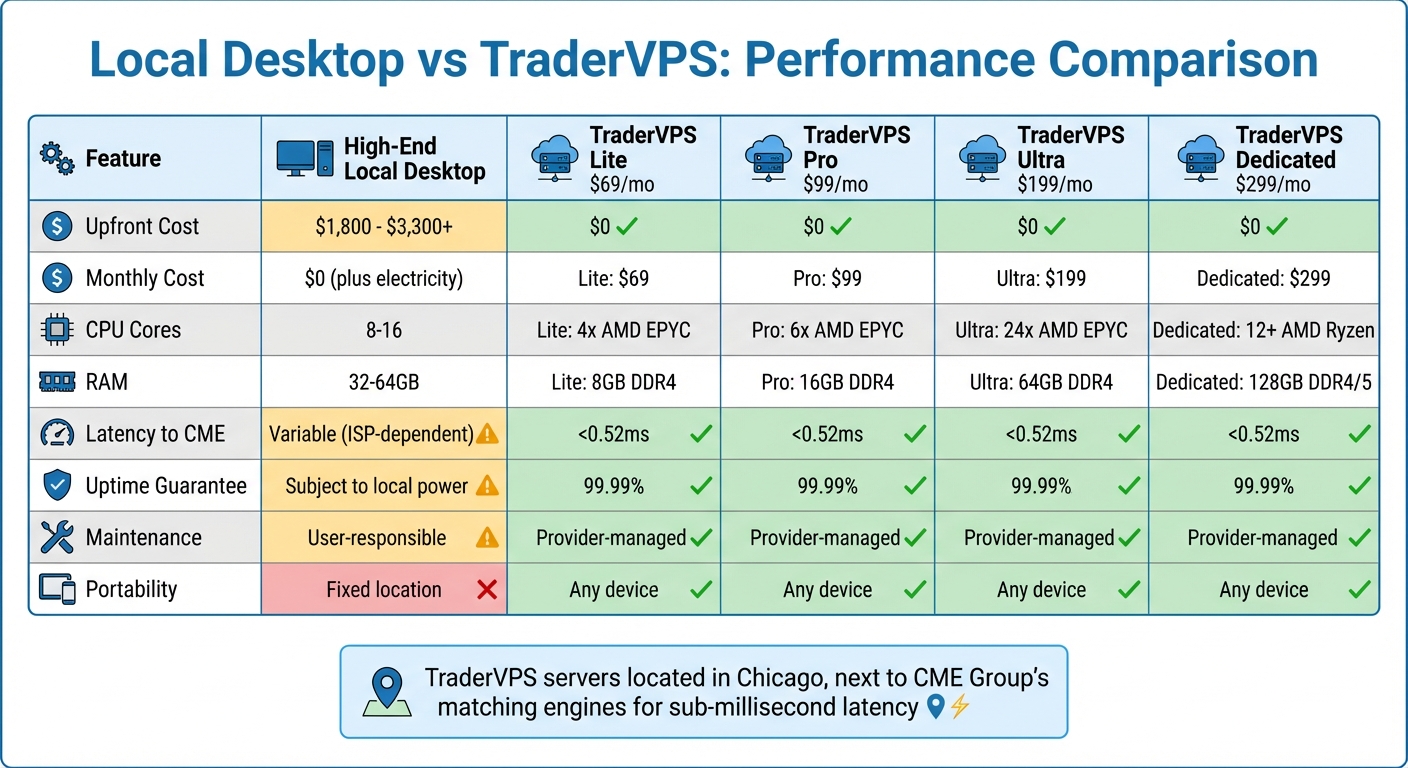
Local Desktop vs TraderVPS Performance Comparison for Stock Trading
Building on the earlier discussion of hardware essentials, let’s dive into the performance differences between local desktops and TraderVPS. The choice between these two options largely depends on how well each meets the demands of live futures trading. A high-end local trading desktop typically costs $1,800 to $3,300+, depending on your software needs. Add to that the cost of a UPS backup - around $150 - to protect against power outages that could disrupt trades[4][6].
However, local setups face challenges, especially during periods of high market volatility. Intense market activity generates heavy computational loads, causing CPUs to heat up significantly[1]. Without advanced cooling systems, thermal throttling can occur, which directly impacts the performance of your trading platform[3]. On top of this, local desktops require regular maintenance and updates to stay optimal.
"Slippage is the difference between what you thought you were going to get when you placed your order and what you actually got. Faster trading computer setups mean less slippage." - Falcon Trading Systems[4]
TraderVPS, on the other hand, removes these headaches. Starting at $69 per month, you gain access to enterprise-grade hardware housed in a professionally managed datacenter near the CME Group's matching engines. There’s no upfront cost for hardware, no cooling issues to worry about, and a 99.99% uptime guarantee ensures you’re protected from local power or internet outages.
Performance Comparison Table
| Feature | High-End Local Desktop | TraderVPS Lite | TraderVPS Pro | TraderVPS Ultra | TraderVPS Dedicated |
|---|---|---|---|---|---|
| Upfront Cost | $1,800 - $3,300+ | $0 | $0 | $0 | $0 |
| Monthly Cost | $0 (plus electricity) | $69 | $99 | $199 | $299 |
| CPU Cores | 8-16 | 4x AMD EPYC | 6x AMD EPYC | 24x AMD EPYC | 12+ AMD Ryzen |
| RAM | 32-64GB | 8GB DDR4 | 16GB DDR4 | 64GB DDR4 | 128GB DDR4/5 |
| Storage | 1TB+ NVMe | 70GB NVMe | 150GB NVMe | 500GB NVMe | 2TB+ NVMe |
| Latency to CME | Variable (ISP-dependent) | <0.52ms | <0.52ms | <0.52ms | <0.52ms |
| Network Speed | 100-1000Mbps | 1Gbps+ | 1Gbps+ | 1Gbps+ | 10Gbps+ |
| Monitor Support | Unlimited | Unsupported | Up to 2 | Up to 4 | Up to 6 |
| Uptime Guarantee | Subject to local power | 99.99% | 99.99% | 99.99% | 99.99% |
| Maintenance | User-responsible | Provider-managed | Provider-managed | Provider-managed | Provider-managed |
| Portability | Fixed location | Any device | Any device | Any device | Any device |
These differences in performance and reliability are crucial for live trading, where every millisecond matters.
Why TraderVPS Works Better for Futures Traders
TraderVPS offers infrastructure redundancy that’s difficult and costly to replicate with a local setup. A professional desktop setup not only needs a UPS but also a failover internet connection, such as a 5G hotspot, to avoid interruptions during trades[6]. TraderVPS handles these redundancies seamlessly within its managed datacenter environment.
Geographic proximity to the CME Group's matching engines is another key advantage. TraderVPS servers are strategically located to ensure sub-millisecond latency. In contrast, home internet connections - no matter how fast - introduce variable latency due to ISP routing, network congestion, and distance from the exchange. During volatile market conditions, this latency can directly affect trade execution quality. Reliable infrastructure is just as important as having the right hardware when it comes to optimizing trades.
Another game-changer is accessibility. With Multi-Monitor RDP support, you can access your trading workspace from virtually any device - Windows, Mac, iOS, or Android. Whether you’re traveling, working from a coffee shop, or simply away from your desk, your trading environment remains consistent and fully operational. In contrast, local desktops limit you to a fixed location, which can be a significant drawback for traders on the move.
Conclusion
Building the ideal stock trading system hinges on three key factors: speed, reliability, and multitasking. To handle real-time tick data without delays, your CPU should have high clock speeds - preferably 4GHz or higher. Combine that with at least 16GB of RAM (or 32GB to 64GB for multi-monitor setups) and NVMe SSDs capable of read speeds up to 7,000 MB/s for seamless performance.
"The most important element in a powerful trading computer is a fast processor." - Falcon Trading Systems [4]
For those prioritizing performance, desktop setups are generally the better choice due to their superior cooling and processing capabilities. However, cloud-based managed VPS hosting picks like TraderVPS offer an alternative. Starting at $69 per month, TraderVPS provides enterprise-grade infrastructure with benefits like sub-millisecond latency to major exchanges, 24/7 uptime, and the ability to access your trading platform from any device. Plus, it eliminates worries about local hardware maintenance, power outages, or overheating.
FAQs
What are the advantages of using a cloud-based trading solution like TraderVPS instead of a traditional desktop setup?
Using a cloud-based trading solution like TraderVPS comes with several advantages compared to a traditional desktop setup - especially for professional stock traders. Hosting your trading platform on a high-performance VPS gives you access to ultra-low latency, allowing for quicker trade execution. This speed can help minimize slippage and potentially boost profitability in fast-paced markets.
Another key benefit is reliability. A VPS operates from secure data centers equipped with redundant power and network systems, meaning you’re not dependent on your home internet or power supply. Even during local outages, your trading environment stays online and stable. On top of that, you can access your trading platform from virtually anywhere, without the need to manage or upgrade costly desktop hardware.
With faster execution, enhanced reliability, and greater flexibility, TraderVPS lets you focus entirely on trading, leaving behind the worries of technical disruptions.
Why is the CPU important for a stock trading computer's performance?
When it comes to your stock trading computer, the CPU plays an absolutely central role. It’s responsible for processing real-time data, handling complex calculations, and managing multiple tasks at once. Choosing a fast, high-performance CPU with multiple cores and impressive clock speeds can make a world of difference. It ensures your trading platforms run smoothly, minimizes latency, and allows you to multitask effortlessly - key factors when every second counts in executing trades.
On the flip side, a slower or less capable CPU can struggle to keep up with the demands of live trading. This can lead to frustrating delays, missed opportunities, and even slippage. If you’re serious about trading, investing in a powerful processor isn’t just a luxury - it’s a necessity for maintaining speed, precision, and reliability in your trading system.
Why should I choose NVMe SSD storage over a traditional HDD for my trading computer?
NVMe SSDs are a top choice for trading computers because they deliver blazing-fast speeds and minimal latency compared to traditional hard drives. With an NVMe SSD, your computer can boot up almost instantly, launch trading platforms in just seconds, and process real-time market data without lag - critical for making split-second decisions during live trading sessions.
Unlike traditional HDDs, which depend on spinning disks to read and write data, NVMe SSDs utilize advanced flash storage technology and connect directly to your computer's PCIe interface. This setup allows for much faster data transfer rates, ensuring your system stays responsive even when juggling multiple tasks or running demanding trading software. For traders, this means a smoother, more dependable performance that matches the fast-paced nature of the market.