Quant Finance Expertise: Python or Excel for Analytics?
When it comes to quantitative finance, the choice between Python and Excel is all about the task at hand. Python is ideal for handling large datasets, automating processes, and running complex analytics quickly. Excel, on the other hand, is perfect for quick calculations, ad-hoc analysis, and presenting results in a user-friendly format.
Here’s the key takeaway:
- Python excels in speed, scalability, and automation. It’s best for tasks like backtesting, real-time analytics, and large-scale data processing.
- Excel is great for small datasets, quick modeling, and creating polished reports for non-technical audiences.
Quick Comparison
| Feature | Python | Excel |
|---|---|---|
| Data Capacity | Handles millions of rows | Limited to ~1M rows |
| Speed | Faster for large datasets | Slows with larger datasets |
| Automation | Supports scripts and pipelines | VBA macros require manual setup |
| Integration | API and database friendly | Limited external integration |
| Learning Curve | Steeper for beginners | Easier for basic use |
| Cost | Free (open-source) | Paid (Microsoft 365 subscription) |
The best approach? Use both tools together. Python can handle backend processing, while Excel is great for presenting the final results. With Python now integrated into Excel, combining their strengths has never been easier.
Stock Data Analysis: Excel Vs Python | Full Tutorial
Python for Quant Finance Analytics: Benefits and Use Cases
Python has become a go-to language for quantitative finance, largely thanks to its extensive library ecosystem. As the marketfeed Team explains:
"Python is the language of choice for algorithmic trading due to its simplicity, versatility, and strong support in libraries or frameworks." [5]
Its power lies in its ability to handle everything from data processing to live trade execution, making it an essential tool for modern finance professionals.
Core Python Libraries for Quant Finance
At the heart of Python's success in quant finance are its specialized libraries. Pandas is the backbone for working with structured time-series data, such as OHLCV (Open, High, Low, Close, Volume) price feeds for futures contracts. Meanwhile, NumPy provides the computational speed needed for heavy mathematical operations, running up to 20 times faster than standard Python lists [5]. This speed is critical when processing thousands of price ticks per second.
For technical analysis, TA-Lib is invaluable. It offers over 150 built-in indicators like RSI, MACD, and Bollinger Bands, which can dramatically cut down development time for real-time trading systems [5]. Visualization is another key area where Python shines, with Matplotlib and Plotly enabling the creation of both static and interactive charts, such as equity curves and drawdown visuals. For those venturing into machine learning, Scikit-learn supports models like Random Forests for classifying price movements.
| Library | Primary Use | Standout Feature |
|---|---|---|
| Pandas | Data manipulation | DataFrame structure for time-series OHLCV data [5] |
| NumPy | Numerical computing | 20x faster than Python lists for matrix operations [5] |
| TA-Lib | Technical indicators | 150+ built-in indicators with C-based speed [5] |
| Scikit-learn | Machine learning | Traditional ML models like Random Forests [5] |
| Matplotlib/Plotly | Visualization | Static and interactive equity curve charts [7] |
These libraries are the building blocks for automating trading tasks and running effective backtests.
Automation and Backtesting with Python
Python's high-performance libraries make it easy to automate repetitive tasks and simulate market scenarios. For instance, in futures trading, a Python script can run weekly to calculate momentum scores, rank contracts by liquidity, identify front-month candidates, map contract month codes (e.g., F, G, H), and calculate expiration dates (like the third Friday of the month for equity index futures). These steps are part of the essentials of HFT in futures markets that quants must master. This automation eliminates the risk of manual errors and saves time.
When it comes to backtesting, tools like Backtrader are highly regarded. Backtrader simulates realistic broker conditions, including slippage and commissions, across multiple asset classes [6]. Another option, Zipline, uses an event-driven approach, processing data one bar at a time to avoid look-ahead bias - an error where future data is mistakenly used to inform past decisions [6]. For systematic futures strategies, pysystemtrade offers features tailored to institutional workflows, such as position sizing and optimization [6]. Python also integrates seamlessly with platforms like NinjaTrader via PyAlgoTrade [6], and with cloud-based environments like QuantConnect, which provides access to CME, CBOT, and NYMEX futures data dating back to 2009 [8].
Handling Large Datasets with Python
Python is well-equipped to handle the massive datasets often encountered in quantitative finance. For datasets that exceed your system's memory, chunking allows you to process data in smaller, manageable pieces. Libraries like Dask and Modin take this further by distributing computations across multiple CPU cores, making them ideal for platforms for high-frequency trading data or extensive backtests [7]. Additionally, Python's memory management capabilities, such as defining data types upfront and downcasting to smaller integer or float types, can reduce RAM usage by up to 50%. This ensures low latency and smooth scaling as data volumes grow [7].
Excel for Quant Finance Analytics: Benefits and Use Cases
When it comes to quant finance, Python might handle the heavy computational lifting, but Excel shines in its agility and accessibility for everyday analysis. As Bruno J. Navarro, Financial Analyst, explains:
"Excel remains one of the most trusted tools finance professionals use. Even as financial technology evolves, it remains a staple in finance." [9]
The numbers back this up. 96% of financial planning and analysis (FP&A) teams rely on Excel daily [9][10], and over 80% of finance professionals use it for critical tasks like risk analysis and portfolio optimization [12]. For traders needing quick answers without setting up a Python environment, Excel often becomes the go-to tool.
Built-In Excel Tools for Ad Hoc Analysis
One of Excel's greatest strengths is its speed and ease of use. Tools like Goal Seek and Data Tables allow you to quickly tweak variables or run reverse calculations - no coding required. The Solver add-in is another standout feature, enabling users to optimize asset allocations or maximize a portfolio's Sharpe ratio directly within the spreadsheet.
For exploring data, PivotTables provide a fast way to group asset returns by time periods, such as days of the week or months, uncovering seasonal trends in just a few clicks. Meanwhile, the Data Analysis ToolPak adds more advanced functionality, such as regression analysis and tools like FORECAST.ETS, which applies exponential smoothing to detect seasonality in historical price data.
| Function Category | Key Functions | Quant Finance Application |
|---|---|---|
| Financial | XNPV, XIRR, PMT, FV | Assessing irregular cash flows and investment returns |
| Statistical | LINEST, AVERAGE, FREQUENCY | Performing linear regression and analyzing data distributions |
| Lookup/Reference | XLOOKUP, INDEX+MATCH, OFFSET | Dynamically pulling historical metrics |
| Forecasting | FORECAST.ETS, SEASONALITY | Predicting periodic price fluctuations |
| Logical | IF, AND, OR, IFERROR | Building dynamic dashboards and handling errors |
Scenario Analysis and Reporting in Excel
Excel's Scenario Manager is a powerful tool for comparing outcomes. With it, you can switch between best-case, base-case, and worst-case scenarios with a single click. It even generates summary reports that display all scenarios side by side. Each scenario supports up to 32 variables, making it more than adequate for most trading models. For stress-testing portfolios, Data Tables let you analyze how interest rate changes or volatility spikes impact performance across a range of inputs.
On the reporting side, Power Query simplifies data integration by connecting directly to external sources like APIs, market data feeds, or database exports. This eliminates manual data entry and ensures your dashboards stay up to date. For tracking strategy performance, PivotTables offer a "Running Total" setting, which serves as a basic backtesting visualization. If you need more advanced functionality, Excel now supports Python directly within cells using =PY, allowing you to run pandas correlation matrices or Monte Carlo simulations while keeping your dashboard fully formatted [13][14].
Excel's Accessibility and Ease of Use
Excel’s simplicity is one of its biggest advantages for traders. Kris Longmore, Founder of Robot Wealth, sums it up well:
"Excel is a powerful weapon in your trading arsenal." [11]
Unlike Python, Excel doesn’t require installation, configuration, or managing dependencies [15]. This is especially helpful in firms with strict IT policies. Its user-friendly interface and instant feedback make it perfect for quick insights and rapid decision-making.
However, Excel does have its limits. It performs best with datasets up to around 100,000 rows [15]. Beyond that, performance slows, and Python becomes the better tool for handling larger datasets. Still, for most ad hoc analyses, scenario modeling, and polished reporting tasks, Excel remains a reliable and widely understood option. Together, Excel and Python create a balanced toolkit for quant finance professionals, combining Excel's intuitive analysis with Python's computational power for more complex needs.
Python vs. Excel: A Side-by-Side Comparison for Quant Finance Tasks
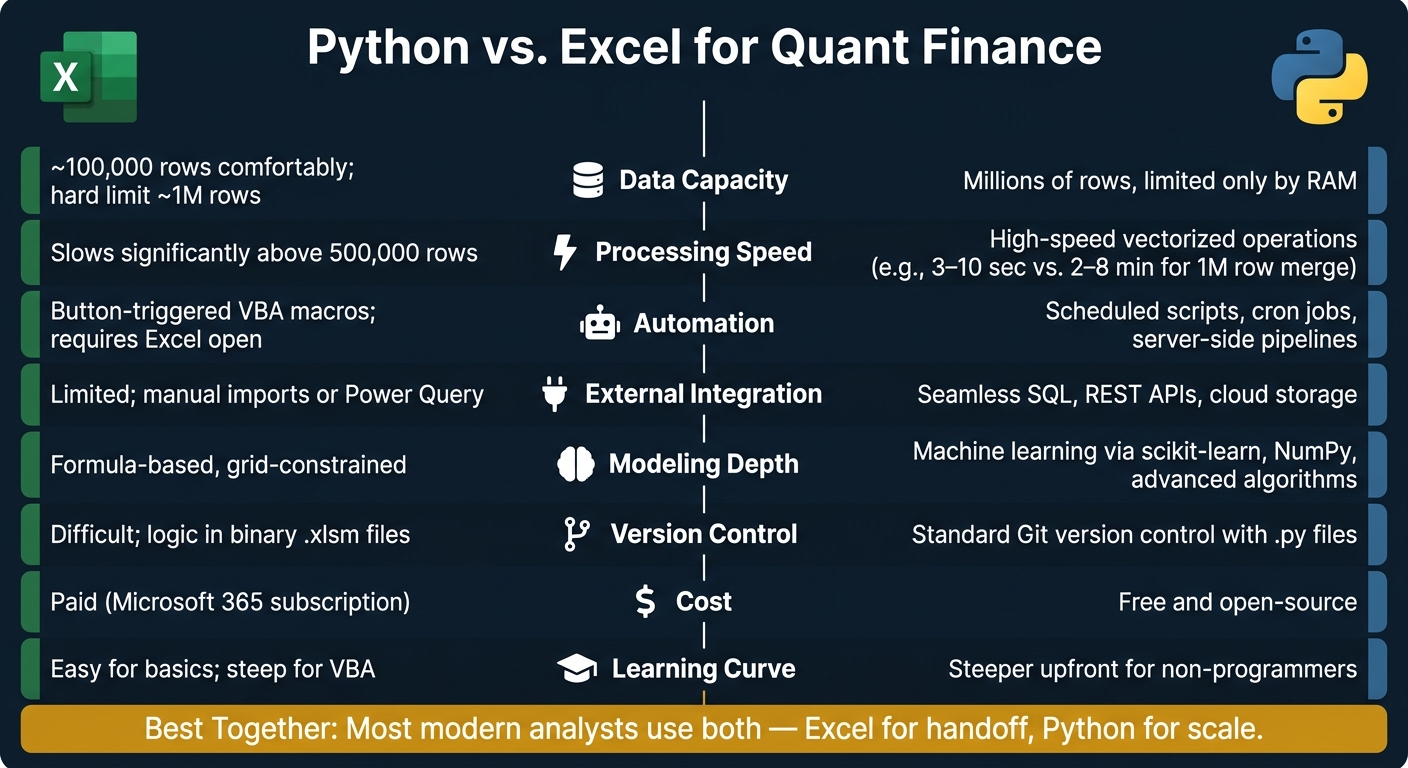
Python vs Excel for Quant Finance: Side-by-Side Comparison
We've looked at each platform individually; now let's put them head-to-head and see how they hold up under real trading workloads.
Comparison Table: Python vs. Excel
| Criteria | Excel | Python |
|---|---|---|
| Data Capacity | ~100,000 rows comfortably; hard limit of 1,048,576 rows [15][2] | Constrained only by available RAM; handles millions of rows with ease [2] |
| Processing Speed | Slows significantly above 500,000 rows [2] | High-speed performance through vectorized operations [3] |
| Automation | Button-triggered macros (VBA); requires Excel to be open [15] | Supports scheduled scripts, cron jobs, and server-side pipelines [2][4] |
| External Integration | Limited; relies on manual imports or Power Query [2] | Seamless integration with SQL, REST APIs, and cloud storage [4] |
| Modeling Depth | Formula-based; restricted by grid structure [3] | Enables machine learning with libraries like scikit-learn and advanced algorithms [4] |
| Version Control | Difficult; logic stored in binary .xlsm files [4][15] | Standard practice with Git and .py files [4] |
| Cost | Paid (Microsoft 365 subscription) [4] | Free and open-source [4] |
| Learning Curve | Easy for basic use; steep for VBA [3] | Steeper upfront for non-programmers [15] |
This table outlines the key differences, but how do these actually play out in tasks like backtesting, real-time analytics, and reporting? Let’s break it down.
Strengths and Limitations of Each Platform
When it comes to backtesting, Python leaves Excel in the dust. For example, in benchmarks involving 1 million rows, VLOOKUP-style merge operations take 2–8 minutes in Excel. Python? It knocks it out in just 3–10 seconds [2]. For strategies that depend on years of tick-level data, this speed advantage is a game-changer.
In real-time analysis, Python offers direct connections to data providers through REST APIs. Excel, on the other hand, often requires manual imports or clunky Power Query setups [15]. As Process Automation Consultant Anas Tabit explains:
"VBA automates what happens inside a running Excel file. Python automates what happens to data before it reaches Excel - and increasingly, everything that happens after it leaves Excel too." [15]
Excel does shine in reporting and accessibility. Its built-in tools like PivotTables, Scenario Manager, and cell formatting are intuitive and don’t require extra installations or IT approval [15]. Python, however, involves managing dependencies, setting up virtual environments, and having at least a basic grasp of programming - which can be a hurdle for teams without a dedicated developer.
Another key difference lies in reproducibility. Python scripts, combined with Git, ensure consistent results and easy collaboration. Excel files, especially those using VBA, are notoriously hard to audit and maintain across a team [4][15]. This can lead to version control headaches and errors that are difficult to track down.
Which Platform Fits Your Trading Workflow?
The technical differences between Python and Excel are clear, but the best choice for you depends on how you work day-to-day. Your trading workflow will ultimately determine which tool deserves a spot in your toolkit.
Platform Recommendations by Use Case
There’s no one-size-fits-all solution here. Instead, the ideal platform varies depending on the specific task you’re tackling.
| Use Case | Recommended Platform | Why |
|---|---|---|
| Ad-hoc analysis and quick modeling | Excel | No setup needed; great for small datasets under 100,000 rows [15] |
| Backtesting on historical tick data | Python | Handles millions of rows with ease; libraries like Zipline and QuantLib are built for this [1] |
| Reporting to non-technical stakeholders | Excel | Offers native charts, PivotTables, and precise cell formatting [15] |
| Automated strategy execution | Python | Can run continuously on servers without manual input [15] |
| API integration (Bloomberg, Refinitiv) | Python | Direct REST API connectivity, which Excel struggles with [4] |
| Risk modeling (Monte Carlo, VaR) | Python | Tools like scikit-learn and NumPy are ideal for advanced statistical analysis [1] |
A good rule of thumb: if your Excel macro takes more than 20 minutes to execute or involves over 500,000 rows, it’s time to shift that task to Python [15].
Many professionals don’t stick to just one tool - they combine both to maximize efficiency.
Using Python and Excel Together in Quant Finance
Python shines when it comes to automation and heavy data processing, while Excel remains unmatched for creating polished, presentation-ready reports. Together, they form a dynamic duo. A smart workflow uses Python for the backend - pulling raw data from SQL databases or APIs, cleaning it, and running models - and Excel for the final touch, formatting results for stakeholders [15].
Here’s how Noble Desktop sums it up:
"Most modern analysts use both - Excel for handoff, Python for scale." [16]
The recent introduction of Python in Excel (via the =PY() function) has made this hybrid approach even smoother. Now, you can run Python libraries like pandas and Matplotlib directly within your spreadsheet, simplifying the transition between the two tools. Anaconda highlights this development:
"The integration of Python into Excel is a game-changer for finance professionals, offering a new level of power and flexibility in data analysis, modeling, and automation." [14]
For those looking for deeper integration, xlwings is worth checking out. It allows Python to call Excel functions and feed live data directly into dashboards, bridging the gap between the two environments [15].
Conclusion: Key Takeaways for Quant Finance Professionals
Final Thoughts on Python vs. Excel
Python and Excel aren't competitors - they're complementary tools that address different needs. Excel shines in quick analyses and reporting, while Python is unmatched for handling complex, large-scale, and repeatable tasks. The real advantage comes from knowing when to use each tool for its strengths.
Next Steps for Traders
Now that you have a clearer understanding, it's time to refine your workflow. Excel users should take a closer look at repetitive manual reports - these are perfect candidates for automation with Python. Even learning just a few pandas basics, like groupby() and pd.merge(), can save you hours of manually working with pivot tables [14].
For those already familiar with Python, consider leveraging the =PY() function in Excel. This feature lets you run pandas and Matplotlib directly within your spreadsheets, eliminating the hassle of switching between platforms. Plus, it makes sharing results with less technical colleagues much smoother [14].
"As the demand for data-driven insights and automation intensifies, mastering Python is becoming essential for individuals in finance who seek to enhance their analytical prowess." - Compounding Insights [3]
The gap between analysts who embrace automation and those who don't is growing. Whether you start small with a single Python script or dive into building a hybrid workflow, the key is to take that first step. Let your daily tasks guide you toward what to improve and automate next.
FAQs
What should I learn first for quant work: Python or Excel?
If you're just starting out in quantitative finance, Excel is a great place to begin. Its intuitive interface makes it perfect for working with smaller datasets, performing quick calculations, and creating visualizations.
However, as your projects become more complex, learning Python becomes a must. Python shines when it comes to handling large datasets, automating repetitive tasks, and performing advanced analytics. While Excel is ideal for prototyping and presenting your work, Python is better suited for tasks that demand scalability and heavy computation.
Many professionals suggest combining the strengths of both tools to get the best results. This approach allows you to leverage Excel's simplicity alongside Python's power for maximum efficiency.
When does Excel get too slow for trading analytics?
Excel tends to struggle with trading analytics when datasets approach its row limit of 1,048,576 rows. Performance issues, like sluggish processing and instability, often emerge with datasets exceeding 500,000 rows or when managing complex calculations. For handling larger datasets or performing more demanding tasks, Python libraries such as Pandas offer a more efficient solution, as they can process data without the constraints and performance bottlenecks of Excel.
How can I combine Python and Excel in one workflow?
Combining Python and Excel opens up a world of possibilities for handling data more efficiently. Tools like 'Python in Excel' allow you to execute Python scripts directly within Excel, making it easy to use powerful libraries like Pandas and NumPy for advanced data analysis.
If you prefer working outside of Excel, libraries such as openpyxl or xlwings offer seamless integration. These tools enable you to automate repetitive tasks, manipulate spreadsheets programmatically, and blend Excel's user-friendly interface with Python's robust computational capabilities. Whether you're analyzing data or building workflows, this combination provides flexibility and efficiency.